> For the complete documentation index, see [llms.txt](https://help.sortpin.com/llms.txt). Markdown versions of documentation pages are available by appending `.md` to page URLs; this page is available as [Markdown](https://help.sortpin.com/download-guides-by-content-type/how-to-download-pinterest-gifs.md).
# How to Download Pinterest GIFs
How to download Pinterest GIFs (animated) as MP4 or GIF format for free. Works on desktop and mobile. Learn why Pinterest converts GIFs to MP4 and how to save the original animated file.
{% hint style="success" %}
**Download Pinterest GIFs the right way.** Pinterest automatically converts GIFs to MP4 videos when uploaded. SortPin gives you both options — download as **MP4** (compatible everywhere) or **GIF** (animated file for messaging apps).
{% endhint %}
> 🎉 **Trusted by 40,000+ Pinterest users worldwide** to save Pinterest GIFs every day.
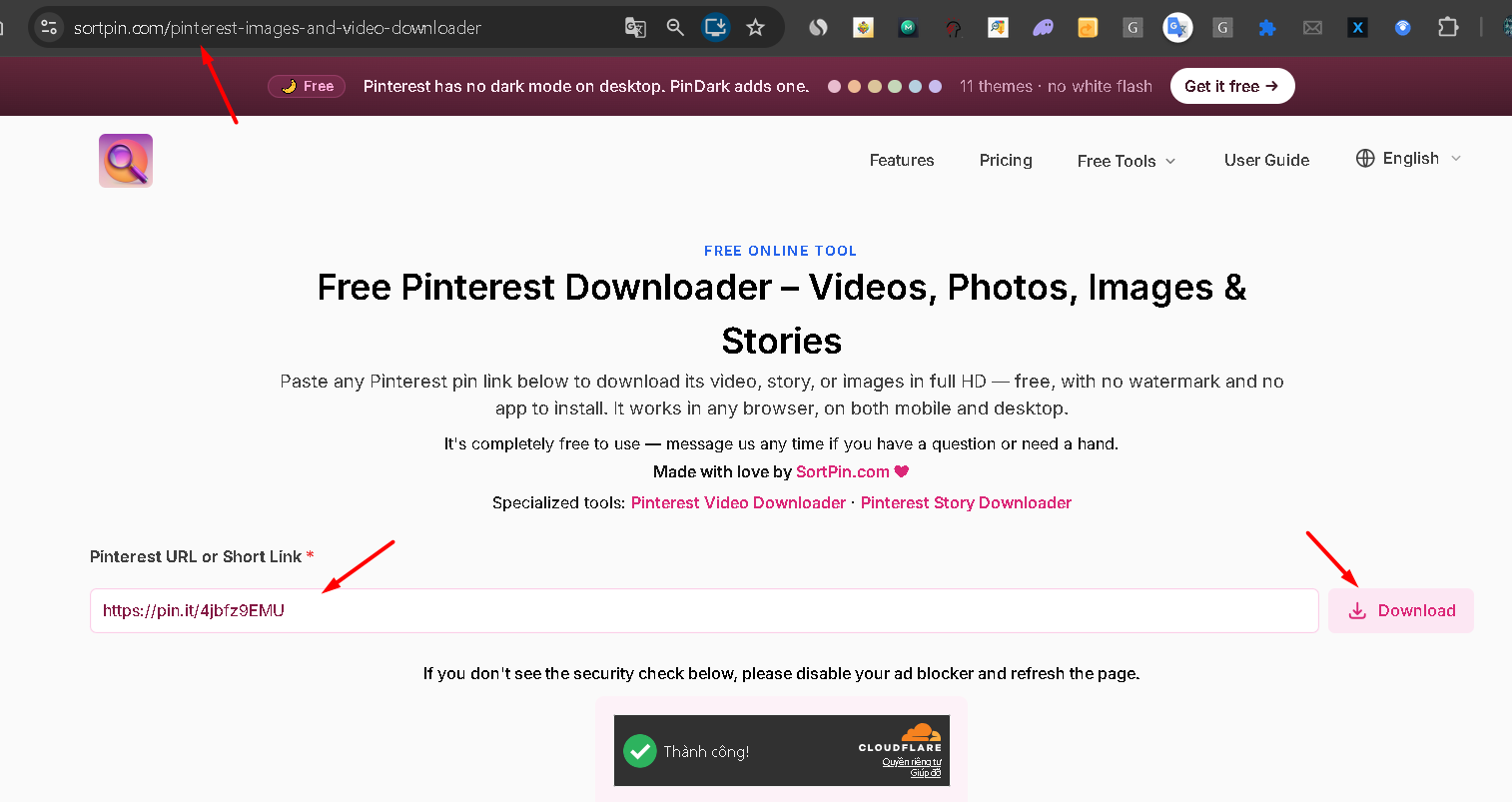
Paste the pin link — pin.it short links work too
## ⚠️ First — An Important Fact About Pinterest GIFs
**Pinterest converts every uploaded GIF to MP4.** This is why "downloading a GIF" from Pinterest usually gives you a **video file** instead of a `.gif` extension.
Depending on your use case, you may want:
* 🎥 **MP4** — smaller file, better quality, works everywhere (recommended)
* 🎬 **GIF** — animated image format, for messaging apps and reactions
SortPin supports **both formats**.
***
## ⚡ 3 Ways to Download Pinterest GIFs
| Method | Output Format | Best For |
| ----------------------- | ------------- | -------------------- |
| 🧩 **Chrome Extension** | MP4 or GIF | Desktop, any quality |
| 🌐 **Website Tool** | MP4 or GIF | Quick one-off |
| 🤖 **Telegram Bot** | MP4 | Mobile, instant |
***
## 🧩 Method 1: Chrome Extension
### Step 1 — Install SortPin
[**Install SortPin (Free) →**](https://sortpin.com). Full guide: [How to Install](/getting-started/how-to-install-sortpin.com-extension.md).
### Step 2 — Find an Animated Pin
Look for pins with the **▶️ play icon** or that autoplay when you hover — those are Pinterest's "GIFs" (actually MP4s).
### Step 3 — Click SortPin → Choose Format
Choose:
* **Download as MP4** — best quality, universal compatibility
* **Download as GIF** — animated GIF format for messaging apps
***
## 🌐 Method 2: Website Tool
1. Copy the Pinterest animated pin URL
2. Go to [**SortPin Downloader**](https://www.sortpin.com/pinterest-images-and-video-downloader)
3. Paste URL → Download
4. Choose format (MP4 or GIF)
***
## 🤖 Method 3: Telegram Bot (Mobile)
1. Open [**@SortPin\_bot**](https://t.me/sortpin_bot)
2. Send: `/pin `
3. Get MP4 file → save to phone
📚 Full guide: [Telegram Bot](/features/telegram-bot-pinterest-images-video-and-story-downloader.md)
***
## 🎯 MP4 vs GIF — Which Format Should You Use?
| Use Case | Recommended Format |
| -------------------------------- | ------------------ |
| 🎬 Sharing on YouTube / TikTok | MP4 |
| 💬 WhatsApp / Telegram sticker | GIF |
| 📱 Instagram Story / Reels | MP4 |
| 🖥️ Desktop wallpaper (animated) | MP4 |
| 📧 Email attachment | GIF (smaller) |
| 🌐 Embedded in website | GIF or MP4 |
| 🎨 Twitter / X post | MP4 |
> 💡 **General rule:** MP4 is smaller and higher quality. GIF is for apps that don't support MP4.
***
## 📱 Download Pinterest GIFs on Any Device
| Device | Best Method | Output |
| -------------------- | ---------------- | ----------------------------- |
| 💻 **Windows / Mac** | Chrome Extension | MP4 or GIF |
| 📱 **iPhone / iPad** | Telegram Bot | MP4 (convert later if needed) |
| 🤖 **Android** | Telegram Bot | MP4 |
***
## 🔧 How to Convert MP4 to GIF (if you already downloaded MP4)
If you got an MP4 but need a GIF:
1. Use free online converter: **CloudConvert**, **Ezgif**, or **Convertio**
2. Or use SortPin's **Download as GIF** option upfront (skip conversion)
***
## 🛠️ Troubleshooting
### "The GIF I downloaded is actually an MP4 file"
That's expected — Pinterest stores GIFs as MP4. Use SortPin's "Download as GIF" option to force GIF output.
### "GIF is very large / low quality"
GIF format is inherently large and low-quality. If size or quality matters, use **MP4 instead**.
### "GIF has no animation — just a still image"
Make sure the pin is actually animated (has the play icon or autoplays on hover). Static images can't be downloaded as GIFs.
### "Bot returns a video, not a GIF"
Telegram Bot outputs MP4 by default. For GIF specifically, use the [Chrome Extension](/getting-started/how-to-install-sortpin.com-extension.md) or [Website Tool](https://www.sortpin.com/pinterest-images-and-video-downloader).
***
## ❓ FAQs
**Q: Why does Pinterest convert GIFs to MP4?** A: MP4 has smaller file sizes and better quality than GIF. Pinterest converts on upload to save bandwidth for all users.
**Q: Can I download a Pinterest GIF as a real .gif file?** A: Yes — use SortPin's "Download as GIF" option (Chrome extension or Website Tool).
**Q: How to download Pinterest GIF on iPhone?** A: Use the [Telegram Bot](/features/telegram-bot-pinterest-images-video-and-story-downloader.md) → get MP4 → convert to GIF if needed with an app like GIPHY.
**Q: How to download Pinterest GIF as video?** A: Same as downloading any Pinterest video — see [How to Download Pinterest Videos](/download-guides-by-content-type/how-to-download-pinterest-videos.md).
**Q: Can I download animated Pinterest wallpapers?** A: Yes — they're MP4 files. Save with SortPin, then set as animated wallpaper using apps like KLWP (Android) or intoLive (iPhone).
**Q: What's the difference between a Pinterest GIF and a Pinterest video?** A: Nothing — Pinterest treats them identically. Both are stored as MP4 files after upload.
**Q: Can I download a Twitter GIF via Pinterest?** A: No. SortPin only works with Pinterest URLs. For Twitter GIFs, use a dedicated Twitter GIF downloader.
**Q: My GIF download failed — what's wrong?** A: Check the pin URL is valid (starts with `pinterest.com/pin/`). See: [SortPin not working](/faqs/if-sortpin-is-not-working-despite-being-installed-what-should-i-do.md)
***
## 🚀 Get Started
1. [🧩 Chrome Extension](/getting-started/how-to-install-sortpin.com-extension.md) — MP4 + GIF options
2. [🌐 Website Tool](https://www.sortpin.com/pinterest-images-and-video-downloader) — no install
3. [🤖 Telegram Bot](/features/telegram-bot-pinterest-images-video-and-story-downloader.md) — mobile MP4
## 👉 Related Guides
* [🎬 How to Download Pinterest Videos](/download-guides-by-content-type/how-to-download-pinterest-videos.md)
* [🖼️ How to Download Pinterest Images](/download-guides-by-content-type/how-to-download-pinterest-images.md)
* [📁 How to Download Entire Pinterest Board](/download-guides-by-content-type/how-to-download-pinterest-board.md)
* [📖 How to Download Pinterest Stories & Reels](/download-guides-by-content-type/how-to-download-pinterest-stories-reels.md)
{% hint style="info" %}
💬 **Need help?** Our [chat support](https://go.crisp.chat/chat/embed/?website_id=48b6c12a-2212-4be1-9e27-2dad7e2d5fb0) team is one click away.
{% endhint %}