> For the complete documentation index, see [llms.txt](https://help.sortpin.com/llms.txt). Markdown versions of documentation pages are available by appending `.md` to page URLs; this page is available as [Markdown](https://help.sortpin.com/download-guides-by-content-type/how-to-download-pinterest-stories-reels.md).
# Download Pinterest Stories, Idea Pins & Reels
How to download Pinterest Stories, Idea Pins, and Reels for free. Learn the difference between Pinterest content types and how to save each one — even ephemeral (temporary) stories before they disappe
{% hint style="success" %}
**Save Pinterest Stories, Idea Pins, and Reels before they disappear.** SortPin captures all Pinterest content types — including multi-frame Story Pins and video Reels — in original quality. No signup, 100% free.
{% endhint %}
> 🎉 **Trusted by 40,000+ Pinterest users worldwide** to save Pinterest stories and reels every day.
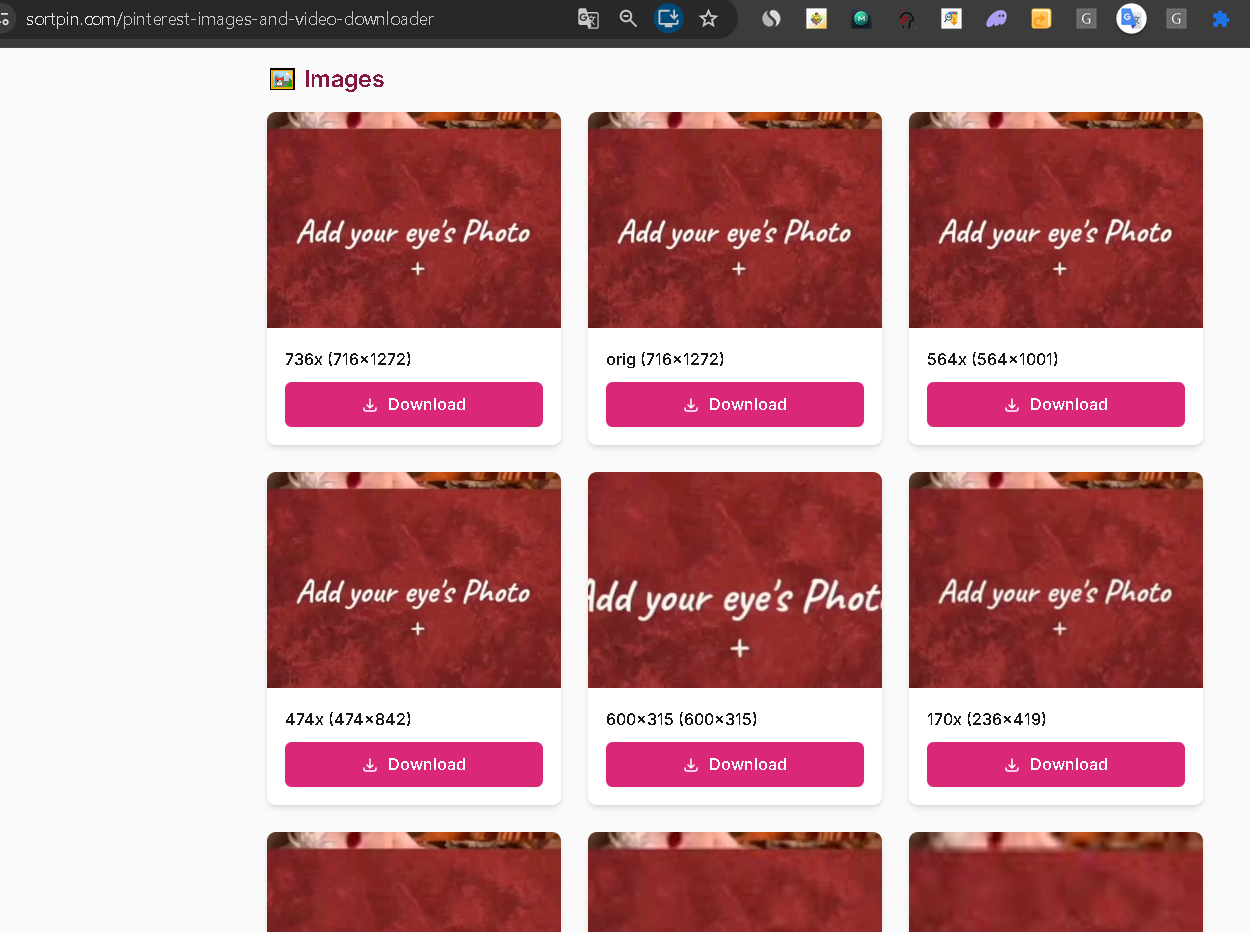
The web tool lists every size Pinterest holds, each with its own download button
## 🔍 First — What's the Difference Between Pinterest Content Types?
Pinterest has multiple content formats that people often confuse:
| Type | What It Is | Downloadable? |
| ------------------------------------ | ------------------------------- | ------------------------- |
| 📌 **Regular Pin** | Single image or video pin | ✅ Yes |
| 📖 **Idea Pin** (formerly Story Pin) | Multi-frame slideshow with text | ✅ Yes (all frames) |
| 🎬 **Video Pin** | Single video pin | ✅ Yes |
| 🎥 **Pinterest Reels** | Short-form vertical video | ✅ Yes |
| 📱 **Pinterest Story** | Temporary content (24-72h) | ✅ Yes (before it expires) |
> 💡 **Key point:** "Story" in Pinterest can mean either **Idea Pin** (permanent) or **ephemeral Story** (temporary). SortPin handles both.
***
## ⚡ How to Download Pinterest Stories (Ephemeral)
Ephemeral Stories **disappear after 24-72 hours** — download them fast if you want to save.
### Method: Chrome Extension
1. [**Install SortPin →**](https://sortpin.com) if you haven't
2. Open the story on Pinterest (from creator's profile)
3. Click the SortPin icon → **Save Story**
4. All frames are downloaded to your computer
> ⏰ **Urgent tip:** If a story is close to expiring, download immediately. Once it's gone from Pinterest, no tool can recover it.
***
## ⚡ How to Download Pinterest Idea Pins (Permanent Story Pins)
Idea Pins are **multi-frame** pins with text overlays, images, and short videos — like Instagram Stories but permanent.
### Method 1: Chrome Extension (Recommended)
1. Open the Idea Pin
2. Click SortPin icon → **Download Idea Pin**
3. Get:
* 🖼️ Every image frame as separate JPG
* 🎬 Every video frame as MP4
* 📄 Text overlay content as TXT (optional)
### Method 2: Website Tool
1. Copy the Idea Pin URL
2. Go to [**SortPin Downloader**](https://www.sortpin.com/pinterest-images-and-video-downloader)
3. Paste URL → Download
4. Get all frames in a ZIP
### Method 3: Telegram Bot (Mobile)
1. Open [**@SortPin\_bot**](https://t.me/sortpin_bot)
2. Send: `/pin `
3. Receive all frames in chat
***
## 🎬 How to Download Pinterest Reels
Pinterest Reels are **short vertical videos** (Pinterest's TikTok-style format).
### 3 Ways
| Method | Best For |
| ------------------- | --------------------- |
| 🧩 Chrome Extension | Desktop, best quality |
| 🌐 Website Tool | Quick one-off |
| 🤖 Telegram Bot | Mobile (iOS/Android) |
**Steps:** Same as [downloading a regular Pinterest video](/download-guides-by-content-type/how-to-download-pinterest-videos.md).
📚 Full video download guide: [How to Download Pinterest Videos](/download-guides-by-content-type/how-to-download-pinterest-videos.md)
***
## 💾 What You Get for Each Content Type
| Content | Format | Notes |
| ----------------------------- | --------------------- | -------------------------------------------------------------------------------------------------------------------------------------------------------------------------- |
| 📖 **Idea Pin (5 frames)** | 5 JPGs + optional TXT | Text overlays saved separately |
| 📖 **Idea Pin (mixed media)** | JPGs + MP4s | Each frame saved by type |
| 🎬 **Reel** | Single MP4 | Original vertical resolution |
| 📱 **Story** | JPGs + MP4s | All frames before expiry |
| 📌 **Regular Pin** | Single JPG or MP4 | See [images](/download-guides-by-content-type/how-to-download-pinterest-images.md) or [videos](/download-guides-by-content-type/how-to-download-pinterest-videos.md) guide |
***
## 📱 Download on Mobile (iPhone / Android)
Pinterest Stories, Idea Pins, and Reels can all be downloaded on mobile via the [Telegram Bot](/features/telegram-bot-pinterest-images-video-and-story-downloader.md).
### iPhone / iPad
1. Open Pinterest app → tap the Story/Idea Pin/Reel → tap Share → Copy Link
2. Open Telegram → [**@SortPin\_bot**](https://t.me/sortpin_bot)
3. Send: `/pin `
4. Save the file to Camera Roll
### Android
Same as iPhone but files save to your Gallery.
***
## 🎯 Use Cases
* 📸 **Content creators** — save inspiring Idea Pins and Reels for reference
* 🎥 **Video editors** — collect Reels for editing techniques study
* 🛒 **E-commerce** — save Story Pins showing competitor product launches
* 🎨 **Designers** — capture multi-frame Story Pin design inspiration
* 📊 **Marketers** — archive top-performing Story Pin campaigns
* 🎓 **Students** — save educational Idea Pins offline
***
## 🛠️ Troubleshooting
### "Story is gone before I could download"
Ephemeral stories expire in 24-72 hours. Once expired, they're **permanently deleted** from Pinterest — no tool can recover them.
### "Only got 1 frame from an Idea Pin"
Make sure you're using the **full Idea Pin URL**, not a single-frame share link. The URL should end with the Idea Pin ID, not a frame index.
### "Video Reel quality is low"
You get the same quality the creator uploaded. Pinterest doesn't upscale content.
### "Can't find the download link on Pinterest"
Pinterest doesn't offer a native download button. That's what SortPin is for — it adds the download capability.
### "Telegram Bot doesn't recognize the URL"
Idea Pins and Reels use the same URL format as regular pins. If it fails, copy the URL directly from the browser address bar (not the "Share" button).
***
## ❓ FAQs
**Q: What's the difference between a Pinterest Story and an Idea Pin?** A: Idea Pin = permanent multi-frame content. Story = temporary content (like Instagram Stories). Both are supported by SortPin.
**Q: How to download Pinterest Idea Pins (formerly Story Pins)?** A: Use SortPin Chrome Extension → click "Download Idea Pin" → all frames save individually.
**Q: How to download a Pinterest Reel?** A: Same as any Pinterest video — see [How to Download Pinterest Videos](/download-guides-by-content-type/how-to-download-pinterest-videos.md).
**Q: Can I download a story before it expires?** A: Yes — if you can view the story on Pinterest, SortPin can download it. Do it fast.
**Q: How to download Pinterest Reels on iPhone?** A: Use the [Telegram Bot](/features/telegram-bot-pinterest-images-video-and-story-downloader.md) → paste Reel URL → save to Camera Roll.
**Q: Can I download an entire Story Pin series (multi-frame)?** A: Yes — SortPin downloads all frames in one action. Images save as JPGs, videos as MP4s.
**Q: Are Pinterest Stories the same as Instagram Stories?** A: Conceptually similar (temporary content) but Pinterest's Story feature is more limited. Some creators may not have access to Stories yet.
**Q: How to save Pinterest Reels to my camera roll?** A: iPhone: Share → Copy Link → send to Telegram Bot → save. Android: same or use website tool + browser download.
**Q: Do downloaded Idea Pins keep the text overlays?** A: Text overlays are rendered onto the image if you download as **JPG**. For raw text separately, use SortPin's "Export Text" option.
**Q: Can I download someone's entire Idea Pin history?** A: Yes — use board bulk download. See: [How to Download Entire Pinterest Board](/download-guides-by-content-type/how-to-download-pinterest-board.md)
***
## 🚀 Get Started
1. [🧩 Install Chrome Extension](/getting-started/how-to-install-sortpin.com-extension.md)
2. [🌐 Website Tool](https://www.sortpin.com/pinterest-images-and-video-downloader) — no install
3. [🤖 Telegram Bot](/features/telegram-bot-pinterest-images-video-and-story-downloader.md) — mobile-friendly
## 👉 Related Guides
* [🎬 How to Download Pinterest Videos](/download-guides-by-content-type/how-to-download-pinterest-videos.md)
* [🖼️ How to Download Pinterest Images](/download-guides-by-content-type/how-to-download-pinterest-images.md)
* [🎨 How to Download Pinterest GIFs](/download-guides-by-content-type/how-to-download-pinterest-gifs.md)
* [📁 How to Download Entire Pinterest Board](/download-guides-by-content-type/how-to-download-pinterest-board.md)
{% hint style="info" %}
💬 **Need help?** Our [chat support](https://go.crisp.chat/chat/embed/?website_id=48b6c12a-2212-4be1-9e27-2dad7e2d5fb0) team is one click away.
{% endhint %}