> For the complete documentation index, see [llms.txt](https://help.sortpin.com/llms.txt). Markdown versions of documentation pages are available by appending `.md` to page URLs; this page is available as [Markdown](https://help.sortpin.com/download-guides-by-content-type/how-to-download-pinterest-videos.md).
# How to Download Pinterest Videos — HD, 4K, No Watermark
How to download Pinterest videos in HD/4K quality for free — 3 methods (Chrome extension, website tool, Telegram bot). No watermark, works on desktop and mobile. Step-by-step guide.
{% hint style="success" %}
**Download any Pinterest video in original HD quality — 100% free.** SortPin offers 3 ways to save Pinterest videos: Chrome extension (fastest), website tool (no install), or Telegram bot (mobile-friendly). No watermark, no signup.
{% endhint %}
> 🎉 **Trusted by 40,000+ Pinterest users worldwide** — download millions of Pinterest videos every day.
## ⚡ 3 Ways to Download Pinterest Videos
| Method | Best For | Speed | Install Needed? |
| ----------------------- | ----------------------- | ----------- | --------------- |
| 🧩 **Chrome Extension** | Daily use, HD quality | ⚡⚡⚡ Fastest | Yes (30s) |
| 🌐 **Website Tool** | One-off downloads | ⚡⚡ Fast | No |
| 🤖 **Telegram Bot** | Mobile (iPhone/Android) | ⚡⚡ Fast | Telegram only |
***
## 🧩 Method 1: Chrome Extension (Recommended)
The fastest way to download Pinterest videos — 2 clicks, without leaving Pinterest.
### Step 1 — Install SortPin
[**Install SortPin Chrome Extension →**](https://sortpin.com) (free, 30 seconds). Full guide: [How to Install SortPin](/getting-started/how-to-install-sortpin.com-extension.md).
### Step 2 — Find a Pinterest Video
Browse Pinterest → hover over any video pin.
### Step 3 — Right-click SortPin Icon → Download
Click the SortPin icon → **Download Video** → choose quality (HD, SD, MP4).
Download Pinterest videos in 2 steps
***
## 🌐 Method 2: Website Tool (No Install)
Perfect if you don't want to install anything.
1. Copy the Pinterest video URL (from address bar or Share button)
2. Go to [**SortPin Pinterest Video Downloader**](https://www.sortpin.com/pinterest-images-and-video-downloader)
3. Paste URL → click Download → save the MP4
***
## 🤖 Method 3: Telegram Bot (Best for Mobile)
Perfect for **iPhone, iPad, and Android** users.
1. Open [**@SortPin\_bot**](https://t.me/sortpin_bot) on Telegram
2. Send: `/pin `
3. Receive MP4 in chat → save to Camera Roll / Gallery
📚 Full guide: [Pinterest Telegram Bot](/features/telegram-bot-pinterest-images-video-and-story-downloader.md)
***
## 🎯 Video Quality Options
| Quality | File Size | Best For |
| ----------------- | --------- | ------------------------ |
| 🎬 **4K** (2160p) | Large | Wallpapers, HD editing |
| 🎥 **1080p** | Medium | Most users (recommended) |
| 📺 **720p** | Small | Mobile viewing |
| 📱 **SD** (480p) | Smallest | Slow connections |
> 💡 SortPin always serves the **highest quality available**. If a video looks low-res, the original upload was low-res.
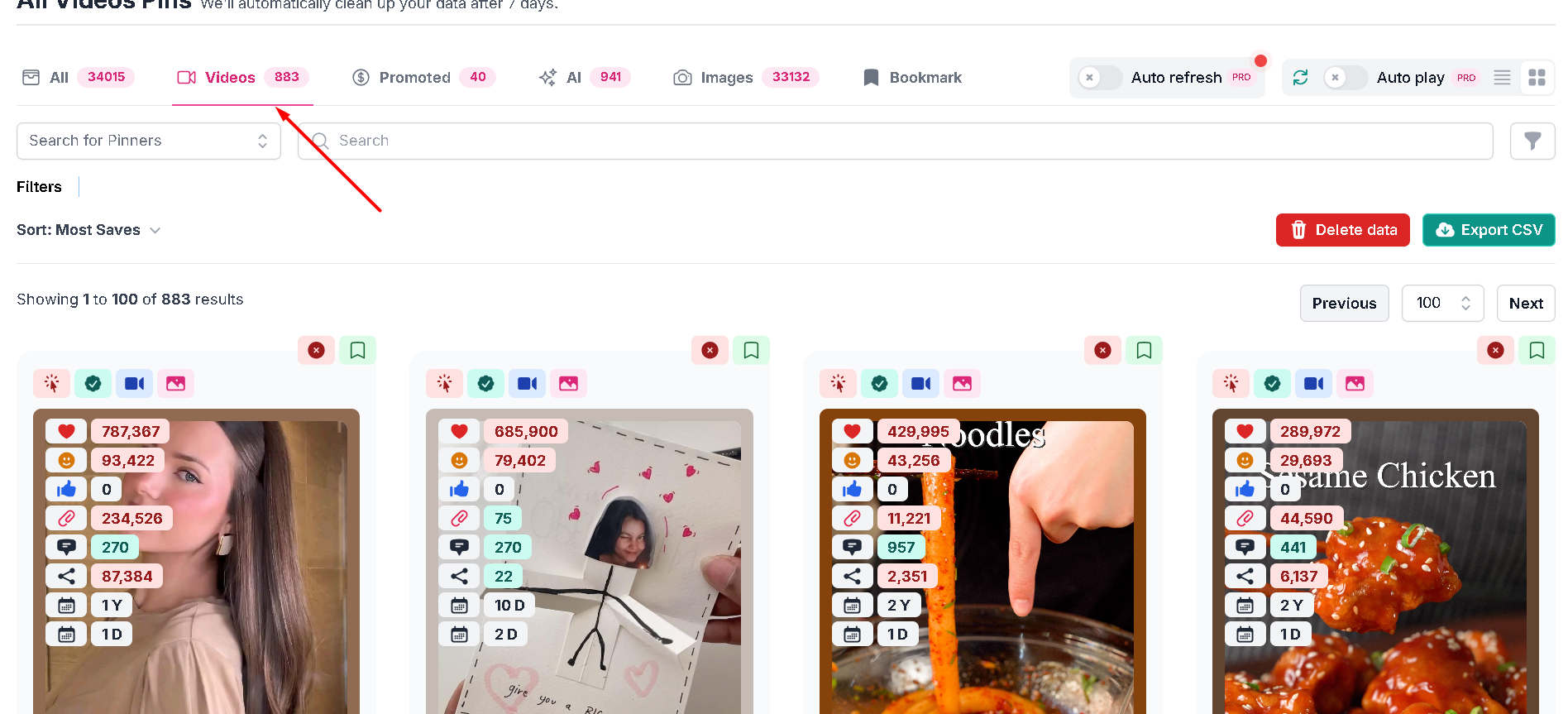
The Videos tab isolates every video pin you've browsed, sorted by saves
***
## 📱 Download Pinterest Videos on Any Device
| Device | Best Method |
| --------------------- | --------------------------------------------- |
| 💻 **Windows PC** | Chrome Extension |
| 🖥️ **MacBook / Mac** | Chrome Extension |
| 📱 **iPhone / iPad** | Telegram Bot |
| 🤖 **Android** | Telegram Bot or mobile browser + Website Tool |
| 🐧 **Linux** | Chrome Extension |
***
## 🛠️ Troubleshooting
### "Pinterest won't let me download the video"
Pinterest disabled right-click on their site. Use SortPin Chrome Extension or Website Tool instead — they bypass this limitation legally.
### "Video downloads without sound"
Some Pinterest videos are uploaded as **silent files** (animated GIFs converted to MP4). If the original has no audio, the download won't either.
### "Video quality is low"
You get the same quality the pin creator uploaded. SortPin can't upscale beyond the original file quality.
### "Bot / extension says 'invalid URL'"
Make sure the URL is a valid Pinterest video pin (starts with `pinterest.com/pin/` or `pin.it/`).
***
## ❓ FAQs
**Q: Can I download Pinterest videos without watermark?** A: Pinterest videos come without any watermark by default. Files are downloaded exactly as the creator uploaded them.
**Q: How to download Pinterest video to iPhone Camera Roll?** A: Use the [Telegram Bot](/features/telegram-bot-pinterest-images-video-and-story-downloader.md). Send `/pin ` → tap the video → Save to Camera Roll.
**Q: Can I download in MP4 format?** A: Yes — all Pinterest videos are downloaded as MP4 by default.
**Q: How to download Pinterest video in 4K quality?** A: If the original was uploaded in 4K, SortPin serves it in 4K. Check the "Quality" dropdown after fetching.
**Q: Can I download multiple videos at once?** A: The Chrome Extension supports batch downloads from boards and search results. See: [How to download entire Pinterest board](/download-guides-by-content-type/how-to-download-pinterest-board.md)
**Q: Why can't I download Pinterest videos on mobile?** A: Mobile browsers restrict downloads. Use the [Telegram Bot](/features/telegram-bot-pinterest-images-video-and-story-downloader.md) instead — it's designed for mobile.
**Q: Do you store the videos I download?** A: No. All downloads happen in real-time from Pinterest to your device.
**Q: Is downloading Pinterest videos legal?** A: SortPin provides the technical tool. You're responsible for respecting copyright. Download only for personal use or with permission from the content creator.
***
## 🚀 Get Started
1. [🧩 Install Chrome Extension](/getting-started/how-to-install-sortpin.com-extension.md) — fastest option
2. [🌐 Try website tool](https://www.sortpin.com/pinterest-images-and-video-downloader) — no install
3. [🤖 Try Telegram Bot](/features/telegram-bot-pinterest-images-video-and-story-downloader.md) — mobile-friendly
## 👉 Related Guides
* [🖼️ How to Download Pinterest Images](/download-guides-by-content-type/how-to-download-pinterest-images.md)
* [🎨 How to Download Pinterest GIFs](/download-guides-by-content-type/how-to-download-pinterest-gifs.md)
* [📁 How to Download Entire Pinterest Board](/download-guides-by-content-type/how-to-download-pinterest-board.md)
* [📖 How to Download Pinterest Stories & Reels](/download-guides-by-content-type/how-to-download-pinterest-stories-reels.md)
* [🏆 Best Pinterest Downloader Apps Compared](/download-guides-troubleshooting-and-info/best-pinterest-downloader-apps.md)
* [🇻🇳 Tiếng Việt: Cách tải video Pinterest không logo](/vi/cach-tai-video-pinterest.md)
{% hint style="info" %}
💬 **Need help?** Our [chat support](https://go.crisp.chat/chat/embed/?website_id=48b6c12a-2212-4be1-9e27-2dad7e2d5fb0) team is one click away.
{% endhint %}