# Free Pinterest Images, Video and Story Downloader

{% hint style="success" %}
**Download Pinterest content in original quality — completely free.** SortPin lets you save Pinterest images, videos, and stories with no watermark, no signup, and no limits. Works with single pins, board galleries, and even private boards you have access to.
{% endhint %}

> 🎉 **Trusted by 40,000+ Pinterest users worldwide** to download HD images, videos, and stories every day.

## ⚡ Two Ways to Download Pinterest Content

| Method                                                            | Best For                              | Speed       | Features                         |
| ----------------------------------------------------------------- | ------------------------------------- | ----------- | -------------------------------- |
| 🧩 [**Chrome Extension**](#method-1-chrome-extension-recommended) | Daily Pinterest users, bulk downloads | ⚡⚡⚡ Fastest | Right-click → Download instantly |
| 🌐 [**Website Tool**](#method-2-website-tool-no-install)          | One-off downloads, mobile users       | ⚡⚡ Fast     | Paste URL → Download             |

***

## 🧩 Method 1: Chrome Extension (Recommended)

The fastest way — download any pin in just **2 clicks** without leaving Pinterest.

### Step 1 — Install the SortPin extension

[**Install SortPin (Free)**](https://sortpin.com/) — takes 30 seconds. Need help? See [step-by-step install guide](/getting-started/how-to-install-sortpin.com-extension.md).

### Step 2 — Right-click the SortPin icon & download

Hover over any pin → click the SortPin icon → choose **Download Image** or **Download Video**.

<figure><img src="/files/UC5JpdYpK3tmW6DXEgVo" alt="Download Pinterest videos in 2 steps"><figcaption><p>Download Pinterest videos easily in 2 steps</p></figcaption></figure>

<figure><img src="/files/Mnpgbxi8G2wix7BDgyvf" alt="Download Pinterest images in 2 steps"><figcaption><p><strong>Download Pinterest images easily in 2 steps</strong></p></figcaption></figure>

> 💡 **Pro tip:** Pin the SortPin extension to your Chrome toolbar (🧩 puzzle icon → 📌 pin) for instant access.

***

## 🌐 Method 2: Website Tool (No Install)

No extension? No problem. Use the [**SortPin Pinterest Downloader website**](https://www.sortpin.com/pinterest-images-and-video-downloader) — paste any Pinterest URL and download.

### Supported URL Formats

* `https://www.pinterest.com/pin/510947520243497052/`
* `https://pin.it/1I8EjfvXA`
* Pin URLs from any Pinterest country domain (.co.uk, .de, .jp...)

### Video Walkthrough

{% embed url="<https://www.youtube.com/watch?v=vaCbCqi9jug>" %}
Free Pinterest Images, Video and Story Downloader Tool
{% endembed %}

***

## 📥 How to Use the Website Downloader — Step-by-Step

### Step 1 — Find a pin on Pinterest

Browse Pinterest and find the image, video, or story you want to download.

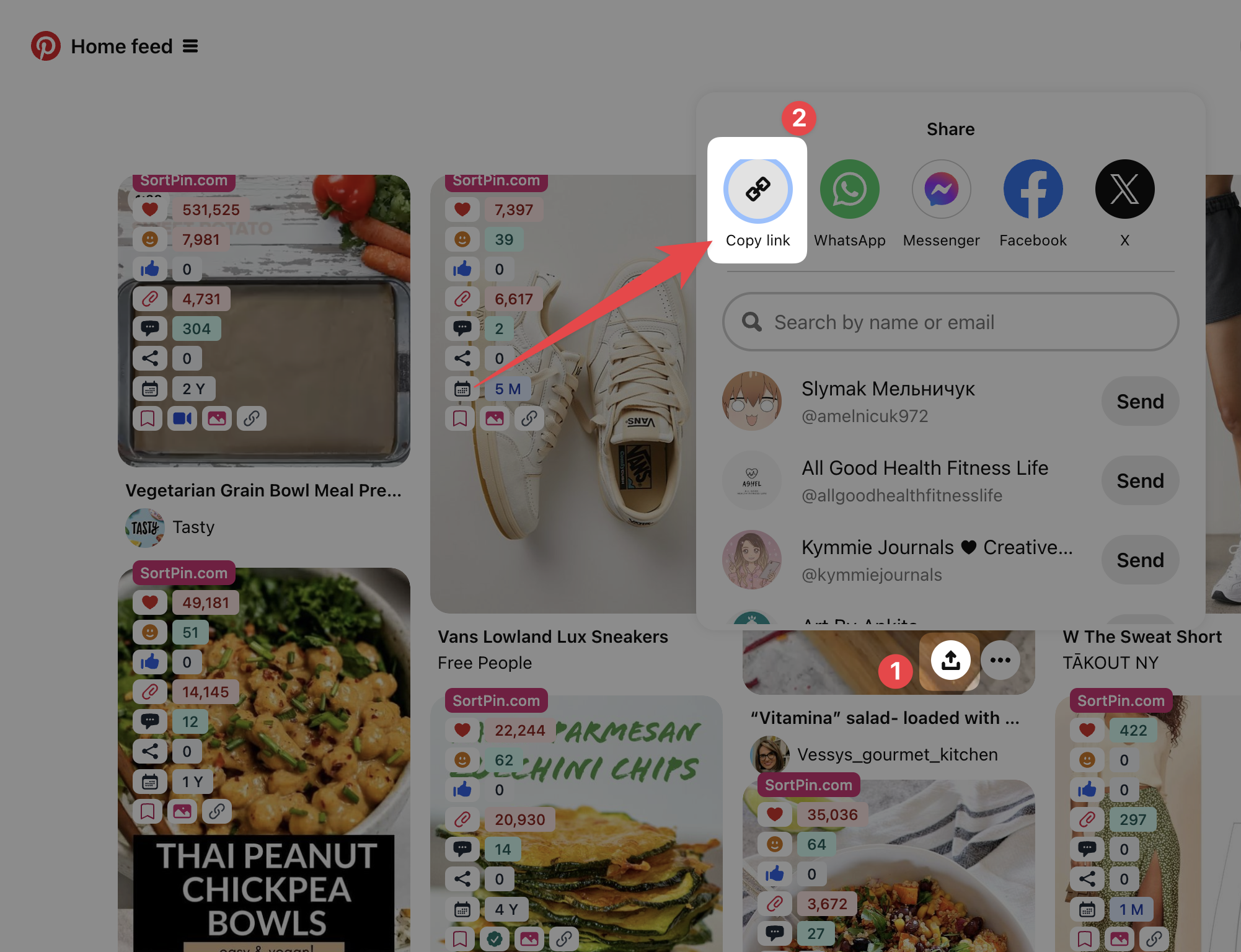
<figure><img src="/files/cg88hPzKzrC05pF0PulJ" alt="Explore all available videos, stories, and images on Pinterest"><figcaption><p>Explore Pinterest videos, stories, and images</p></figcaption></figure>

### Step 2 — Copy the pin link

Click the **share button** on the pin → **Copy link**.

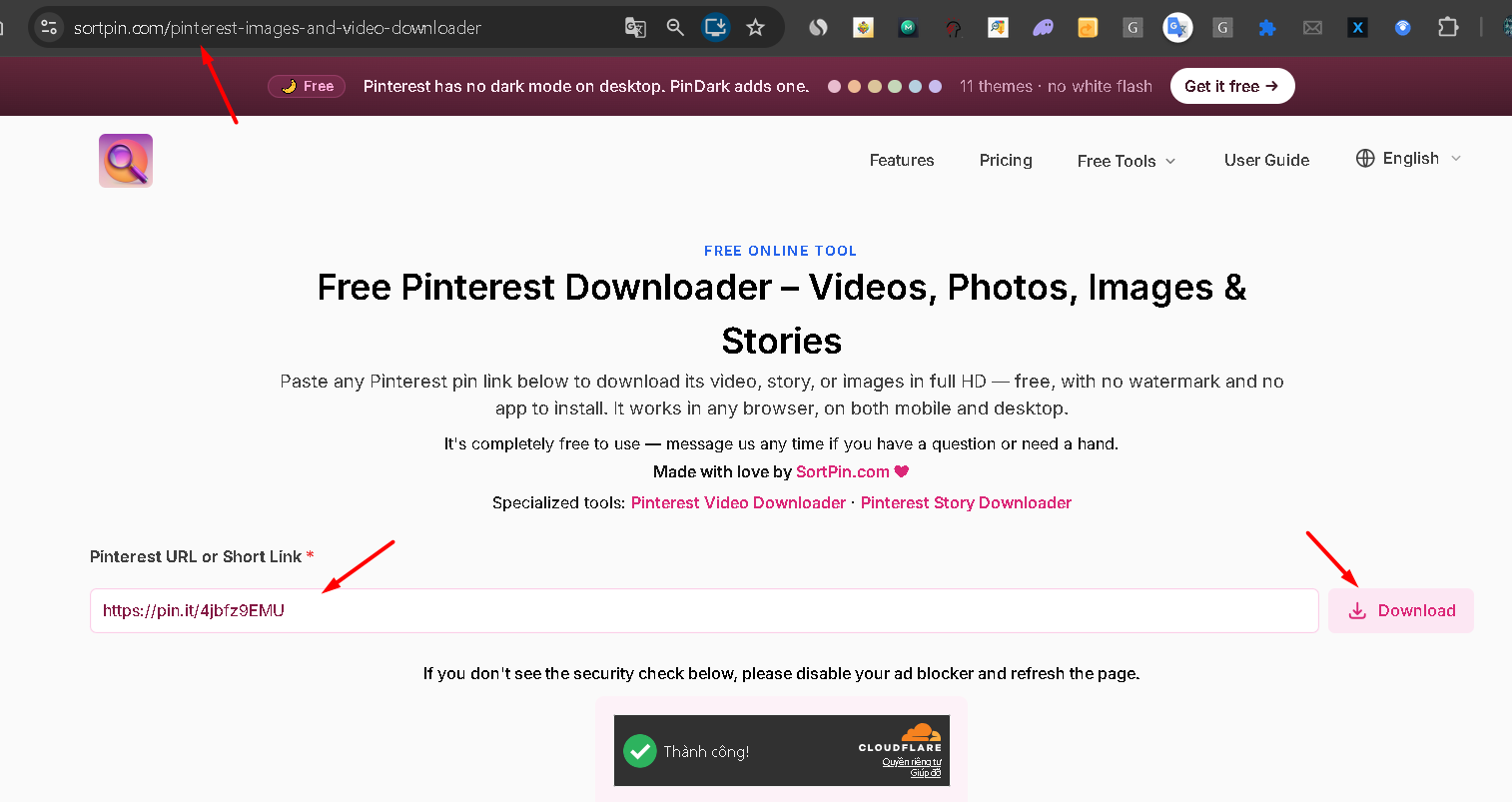
### Step 3 — Paste into SortPin Downloader

Open the [**Pinterest Downloader page**](https://www.sortpin.com/pinterest-images-and-video-downloader) → paste the link in the input box.

<figure><img src="/files/zwH3k938vaPGAr81MpyD" alt="Pinterest Downloader website"><figcaption><p>Go to the <a href="https://www.sortpin.com/pinterest-images-and-video-downloader">Pinterest Downloader website</a></p></figcaption></figure>

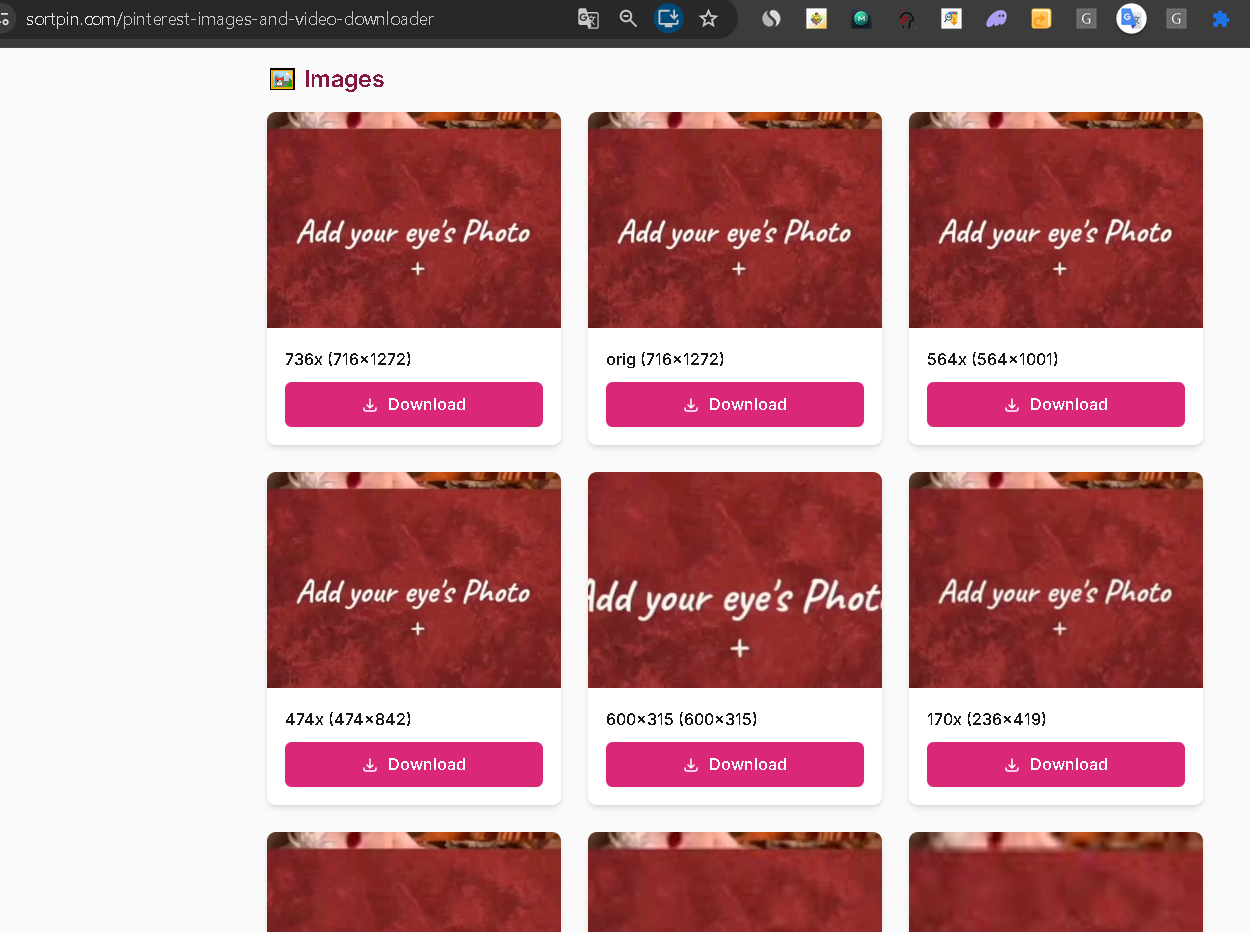
### Step 4 — Click Download & choose format

The tool fetches all available formats (image, video, story). Pick the quality you want and download.

<figure><img src="/files/A50JSyhQ0gvUVpSxlBS3" alt="Download high-quality Pinterest content"><figcaption><p>Download and enjoy your high-quality Pinterest content</p></figcaption></figure>

***

## 🎯 What You Can Download

| Content Type             | Format            | Quality                           |
| ------------------------ | ----------------- | --------------------------------- |
| 🖼️ **Pinterest Images** | JPG, PNG          | Original resolution (up to 4K)    |
| 🎬 **Pinterest Videos**  | MP4               | HD (720p / 1080p where available) |
| 📖 **Pinterest Stories** | MP4 + JPG         | Original quality                  |
| 🎠 **Carousel Pins**     | JPG (multi-image) | Original resolution               |

***

## 💡 Perfect For

* 🎨 **Designers** building moodboards and inspiration libraries
* 📸 **Content creators** sourcing reference images
* 🛒 **E-commerce sellers** tracking product trends and competitor catalogs
* 💼 **Marketers** analyzing winning Pinterest creatives
* 🎓 **Students & researchers** collecting visual references

***

## 📱 Mobile Download (iOS & Android)

The **website tool works on mobile** — open any mobile browser, paste the pin link, and download directly to your phone gallery.

> 🤖 **Even better on mobile:** Use the [**Telegram Bot**](/features/telegram-bot-pinterest-images-video-and-story-downloader.md) — paste the pin link in chat and get the file instantly in Telegram.

***

## 🛠️ Troubleshooting

### "The download isn't working"

* Refresh the page and try again
* Make sure the Pinterest URL is valid (starts with `pinterest.com/pin/` or `pin.it/`)
* Clear your browser cache: [How to Clear Cache](/faqs/how-to-clear-cache-to-speed-up-the-sortpin.com-extension.md)
* See: [If SortPin is not working despite being installed](/faqs/if-sortpin-is-not-working-despite-being-installed-what-should-i-do.md)

### "Video downloads as low quality"

The video quality you get matches the **original upload quality** by the pin creator. SortPin always serves the highest available resolution.

### "I can't download from a private board"

You must be logged into Pinterest and have access to the board. The extension downloads only what you can see.

***

## ❓ Pinterest Downloader FAQs

**Q: How does the SortPin Pinterest downloader work?** A: SortPin fetches pin data from the URL you provide using Pinterest's public API, then displays all available media (image, video, story) for one-click download in original quality.

**Q: Is the Pinterest downloader really free?** A: Yes — 100% free. No hidden charges, no subscriptions, no signup required. Both the Chrome extension and website tool are forever free for basic downloads.

**Q: What types of Pinterest content can I download?** A: Images (JPG/PNG), videos (MP4), stories (MP4 + JPG frames), and carousel pins (multiple images). Essentially anything you can view on a public Pinterest pin.

**Q: Is it legal to download Pinterest content?** A: SortPin only provides the technical tool. You're responsible for respecting copyright. Download **only for personal use** or with permission from the original creator. Never re-upload or commercially use copyrighted content.

**Q: Can I bulk-download multiple pins at once?** A: The free website tool handles one pin at a time. For **bulk downloads**, use the Chrome extension — it supports batch downloading from boards and search results.

**Q: Does the downloader work on iPhone or Android?** A: Yes. The website works in any mobile browser. For the best mobile experience, try our [Telegram Bot integration](/features/telegram-bot-pinterest-images-video-and-story-downloader.md) — even faster.

**Q: Will Pinterest know I downloaded the pin?** A: No. Downloads happen on your device. Pinterest cannot see who downloaded a pin or how.

**Q: Do you store the content I download?** A: No. All downloads happen in real-time directly from Pinterest to your device. SortPin doesn't keep any logs or copies of downloaded files.

**Q: Why is my video downloading without sound?** A: Some Pinterest videos are uploaded as silent (animated GIFs converted to MP4). If the original has no audio, the downloaded file won't have audio either.

**Q: Can I download Pinterest videos with the original watermark removed?** A: SortPin downloads the original file as uploaded by the creator. Pinterest doesn't add watermarks, so files come exactly as the creator uploaded them.

***

## 🚀 Ready to Start Downloading?

1. [🧩 Install the SortPin Chrome Extension](/getting-started/how-to-install-sortpin.com-extension.md) — 30 seconds
2. [🌐 Use the website tool](https://www.sortpin.com/pinterest-images-and-video-downloader) — no install needed
3. [🤖 Try the Telegram Bot](/features/telegram-bot-pinterest-images-video-and-story-downloader.md) — mobile-friendly

{% hint style="info" %}
💬 **Need help?** Our [chat support](https://go.crisp.chat/chat/embed/?website_id=48b6c12a-2212-4be1-9e27-2dad7e2d5fb0) team is one click away.
{% endhint %}


---

# Agent Instructions: Querying This Documentation

If you need additional information that is not directly available in this page, you can query the documentation dynamically by asking a question.

Perform an HTTP GET request on the current page URL with the `ask` query parameter:

```
GET https://help.sortpin.com/features/free-pinterest-images-video-and-story-downloader.md?ask=<question>
```

The question should be specific, self-contained, and written in natural language.
The response will contain a direct answer to the question and relevant excerpts and sources from the documentation.

Use this mechanism when the answer is not explicitly present in the current page, you need clarification or additional context, or you want to retrieve related documentation sections.