> For the complete documentation index, see [llms.txt](https://help.sortpin.com/llms.txt). Markdown versions of documentation pages are available by appending `.md` to page URLs; this page is available as [Markdown](https://help.sortpin.com/features/sortpin-dashboards.md).
# SortPin Dashboards — Pins, Boards & Pinners
A reference for SortPin's dashboards — Pins, Boards and Pinners, their sub-tabs, search, filters, sorting, pagination and export.
{% hint style="info" %}
**Everything SortPin collects lands in one of three dashboards.** They share the same controls — search, filter, sort, export — so learning one teaches you all three. This page is the reference for what each tab holds.
{% endhint %}
> 📍 **Where to find them:** the top row of the SortPin panel — **Pins · Home Feed · Boards · Pinners**.
## 🧭 The Top Row
| Button | What it opens |
| ---------------- | ---------------------------------------------------------------- |
| 📌 **Pins** | All Pins dashboard |
| 🏠 **Home Feed** | **A shortcut**, not a dashboard — opens `pinterest.com/homefeed` |
| 📁 **Boards** | All Boards dashboard |
| 👥 **Pinners** | All Pinners dashboard |
> 🏠 **Home Feed is the odd one out.** It doesn't show collected data — it just jumps you to your Pinterest feed. Handy, but don't go looking for a dashboard behind it.
***
## 📌 All Pins
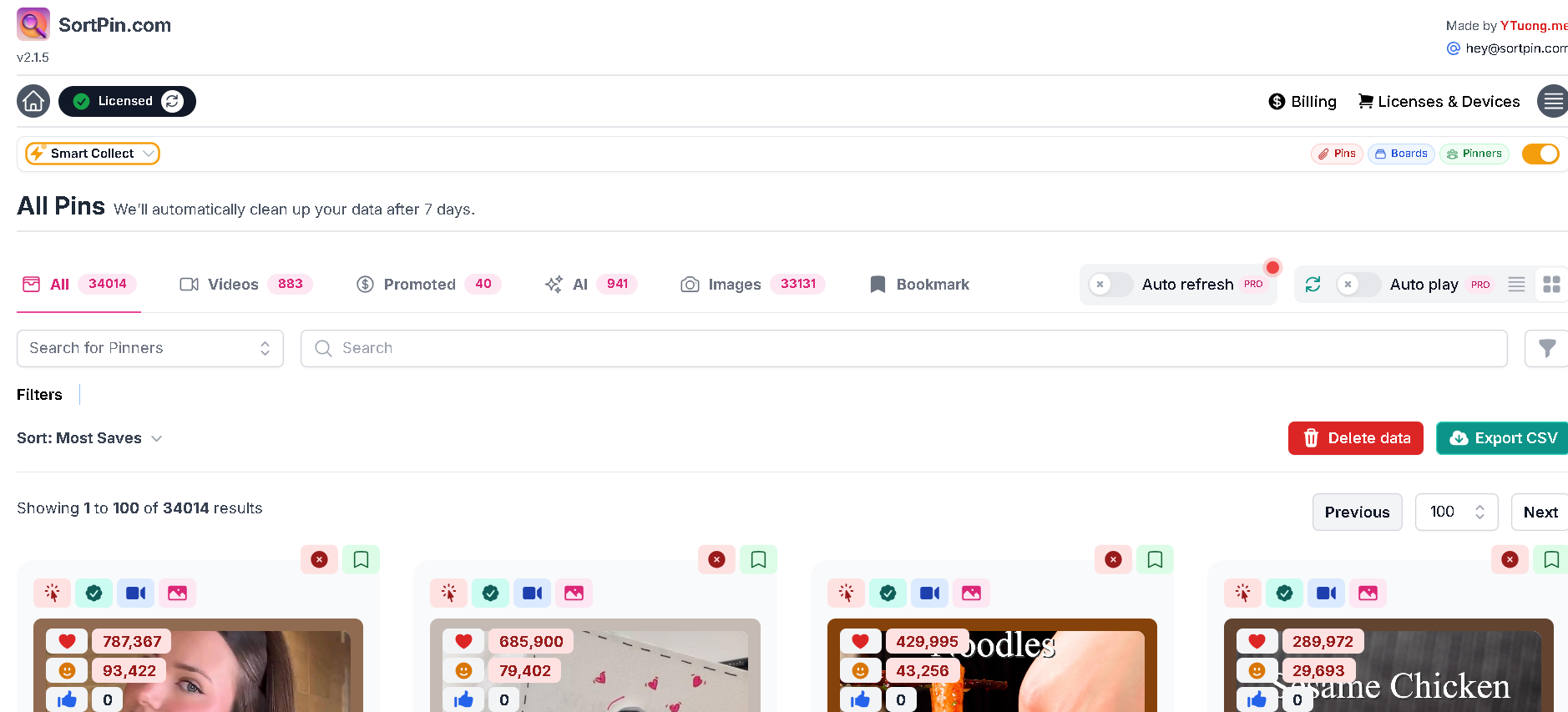
All Pins — sub-tabs with live counts, search, sort, and Export CSV
### Sub-tabs
Each carries a count, so you can see at a glance what your collection is made of.
| Tab | Contains |
| --------------- | ------------------------------------------------------------------ |
| 📋 **All** | Everything collected |
| 🎥 **Videos** | Video pins only — useful for bulk downloading |
| 💲 **Promoted** | Ads — **the only convenient way to study competitor ads at scale** |
| ✨ **AI** | Pins Pinterest flagged as AI-generated |
| 🖼️ **Images** | Static image pins |
| 🔖 **Bookmark** | Pins you bookmarked manually |
> 💲 **The Promoted tab is underused.** Pinterest ads look identical to organic pins while you browse, so collecting them and reading them in one list is the practical way to see what competitors actually pay to promote.
### Pins-only controls
| Control | Licence |
| ------------------- | ------- |
| 🔄 **Auto refresh** | **Pro** |
| ▶️ **Auto play** | **Pro** |
***
## 📁 All Boards
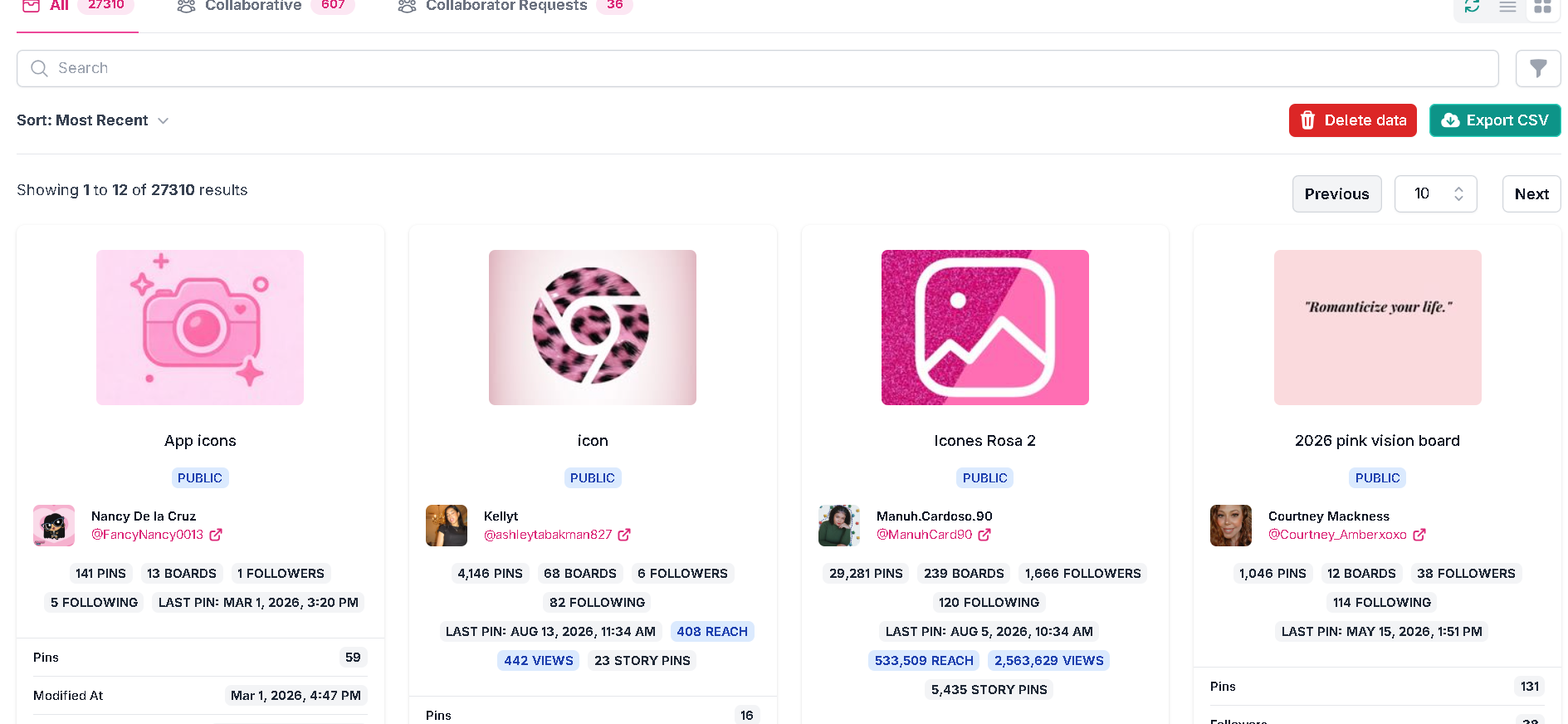
All Boards — each card carries the owner's full public stats
| Tab | Contains |
| ---------------------------- | -------------------------------------------------- |
| 📋 **All** | Every collected board |
| 🤝 **Collaborative** | Group boards — **boards that accept contributors** |
| 📨 **Collaborator Requests** | Boards openly inviting collaborators |
Each board card shows its cover, name, a **PUBLIC** badge, the owner, and the owner's stats: pins, boards, followers, following, last pin date, and where available **reach**, **views** and **story pins**. Below that sit the board's own pin count and when it was last modified.
> 🤝 **This is how you find group boards worth joining** without opening hundreds of profiles. [Full method](https://help.sortpin.com/pinterest-growth-and-analytics/how-to-find-pinterest-group-boards-to-join.md)
***
## 👥 All Pinners
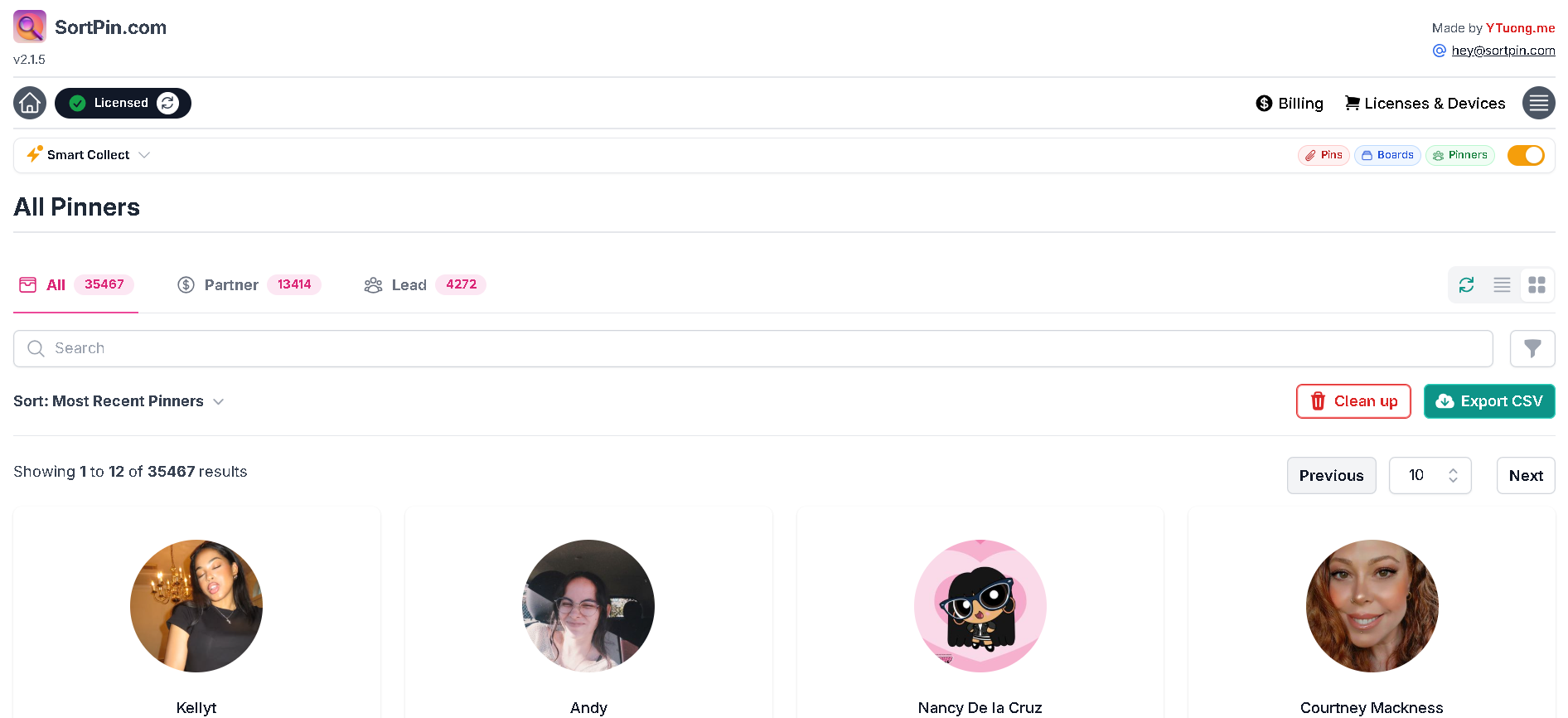
All Pinners — with Partner and Lead segments
| Tab | Contains |
| -------------- | -------------------------------------------------- |
| 📋 **All** | Every collected pinner |
| 💲 **Partner** | Pinners identified as business or partner accounts |
| 👥 **Lead** | Pinners usable as outreach leads |
> 🗑️ **One difference worth knowing:** this dashboard's clear button is labelled **Clean up**, while Pins and Boards use **Delete data**. Same idea, different wording.
📚 [Using the Pinners dashboard for outreach](https://help.sortpin.com/how-to-get-email-addresses-for-email-marketing-for-free.md)
***
## 🎛️ Controls Shared by All Three
### Search and filters
A **search box** plus a **filter funnel** for narrowing the set. The Pins dashboard adds a **Search for Pinners** selector so you can restrict results to one creator.
### Sort
A **Sort** dropdown sits above the results. Defaults differ sensibly per dashboard — Pins opens on **Most Saves**, Boards on **Most Recent**, Pinners on **Most Recent Pinners**.
📚 All nine sort options explained: [How to Sort Pinterest Pins by Saves, Date & Popularity](https://help.sortpin.com/pinterest-growth-and-analytics/how-to-sort-pinterest-pins-by-saves-date-and-popularity.md)
### Pagination
A **Showing X to Y of Z results** line with Previous/Next and a per-page selector. Pins defaults to 100 per page; Boards and Pinners to 10.
> 📄 **Lower the page size if the dashboard feels sluggish.** Rendering 100 board cards with images is far heavier than 10.
### View mode
List and grid icons switch the layout. Grid suits visual scanning; list suits comparing numbers.
### Delete data / Clean up · Export CSV
Clear the collection, or take it with you. Both sit above the results on every dashboard.
***
## ⏳ Remember the 7-Day Window
Every dashboard carries the same note: *"We'll automatically clean up your data after 7 days."*
Collected data is a **working set, not an archive**. Anything you'll want next month needs exporting now.
👉 [How to Export Your SortPin Data to CSV](https://help.sortpin.com/features/sortpin-export-csv.md)
***
## ❓ FAQs
**Q: Where do I see the pins SortPin collected?** A: The **Pins** button at the top of the panel opens the All Pins dashboard.
**Q: What does the Home Feed button do?** A: It's a shortcut to `pinterest.com/homefeed`, not a dashboard. It shows no collected data.
**Q: How do I see only video pins?** A: Open the Pins dashboard and switch to the **Videos** sub-tab.
**Q: How do I find competitor ads?** A: The **Promoted** sub-tab on the Pins dashboard collects every ad you scrolled past, so you can read them in one list.
**Q: What's the difference between Partner and Lead pinners?** A: Partner marks business or partner-type accounts; Lead marks pinners usable for outreach. Both are subsets of All.
**Q: Why is my dashboard slow?** A: Usually too much collected data, or too large a page size. Reduce the per-page number, and turn off collections you don't use in the [Collect tab](https://help.sortpin.com/features/sortpin-collect-settings.md). Full guide: [displaying data slowly](https://help.sortpin.com/displaying-data-slowly.md).
**Q: Which dashboard features need Pro?** A: **Auto refresh** and **Auto play** on the Pins dashboard. Browsing, searching, sorting and exporting are free.
**Q: Does deleting data remove my Pinterest pins?** A: No. It clears SortPin's local copy only. Your Pinterest account is untouched.
***
## 👉 Related Guides
* [📤 How to Export Your SortPin Data to CSV](https://help.sortpin.com/features/sortpin-export-csv.md)
* [🗂️ Collect Tab — Every Setting Explained](https://help.sortpin.com/features/sortpin-collect-settings.md)
* [📊 How to Sort Pinterest Pins by Saves, Date & Popularity](https://help.sortpin.com/pinterest-growth-and-analytics/how-to-sort-pinterest-pins-by-saves-date-and-popularity.md)
* [📌 How to Find Pinterest Group Boards to Join](https://help.sortpin.com/pinterest-growth-and-analytics/how-to-find-pinterest-group-boards-to-join.md)
* [🥳 Overview of Key Features](https://help.sortpin.com/getting-started/overview-of-key-features.md)
{% hint style="info" %}
💬 **A tab showing zero when you expect data?** Tell our [chat support](https://go.crisp.chat/chat/embed/?website_id=48b6c12a-2212-4be1-9e27-2dad7e2d5fb0) team which dashboard — it's usually the matching collection being switched off.
{% endhint %}