> For the complete documentation index, see [llms.txt](https://help.sortpin.com/llms.txt). Markdown versions of documentation pages are available by appending `.md` to page URLs; this page is available as [Markdown](https://help.sortpin.com/pinterest-growth-and-analytics/how-to-find-pinterest-group-boards-to-join.md).

# How to Find Pinterest Group Boards to Join

{% hint style="success" %}
**Group boards are one of the few ways to reach beyond your own followers without paying for ads.** The catch: most of them are dead. This guide covers how to find the active ones and get accepted.
{% endhint %}

> 🎉 **Trusted by 40,000+ Pinterest users worldwide** — group boards remain a favourite growth tactic among them.

## 🤔 What Group Boards Actually Do

A group board (collaborative board) lets multiple contributors pin to the same board. When you pin there, your content can reach **everyone following that board** — not just your own audience.

| Benefit                        | Reality check                            |
| ------------------------------ | ---------------------------------------- |
| 📈 Reach beyond your followers | Only if the board is genuinely active    |
| 🤝 Community connections       | Often the most durable benefit           |
| 🔁 Reciprocal saves            | Depends entirely on group culture        |
| 🎯 Niche targeting             | A focused board beats a huge generic one |

> ⚠️ **Honest framing:** group boards are not the growth cheat code they were in 2016. Pinterest's algorithm now weighs individual pin performance far more heavily. A focused, active board still helps — a dead 400-contributor board does nothing.

***

## 🔍 How to Find Group Boards

### Method 1 — The Collaborative tab (fastest by far)

SortPin collects boards as you browse and then lets you **filter to collaborative boards only** — no manually checking each board for contributor avatars.

**Step 1 — Turn on Boards Collection**

SortPin panel → **Collect** tab → **Smart Collect** → enable **Boards Collection**.

> ⚡ If you're only hunting group boards, turn **Pins** and **Pinners** collection off. A smaller database means a much faster dashboard. See [why](/displaying-data-slowly.md#-the-best-long-term-fix-collect-only-what-you-need).

**Step 2 — Browse your niche**

Search your topic on Pinterest and scroll through results, or use the **Scroll Button** (General tab) to automate it. Boards are collected in the background.

**Step 3 — Open the Boards dashboard**

Click **Boards** in the SortPin panel to open **All Boards**. You get three tabs:

| Tab                          | Contains                                     |
| ---------------------------- | -------------------------------------------- |
| 📋 **All**                   | Every board collected                        |
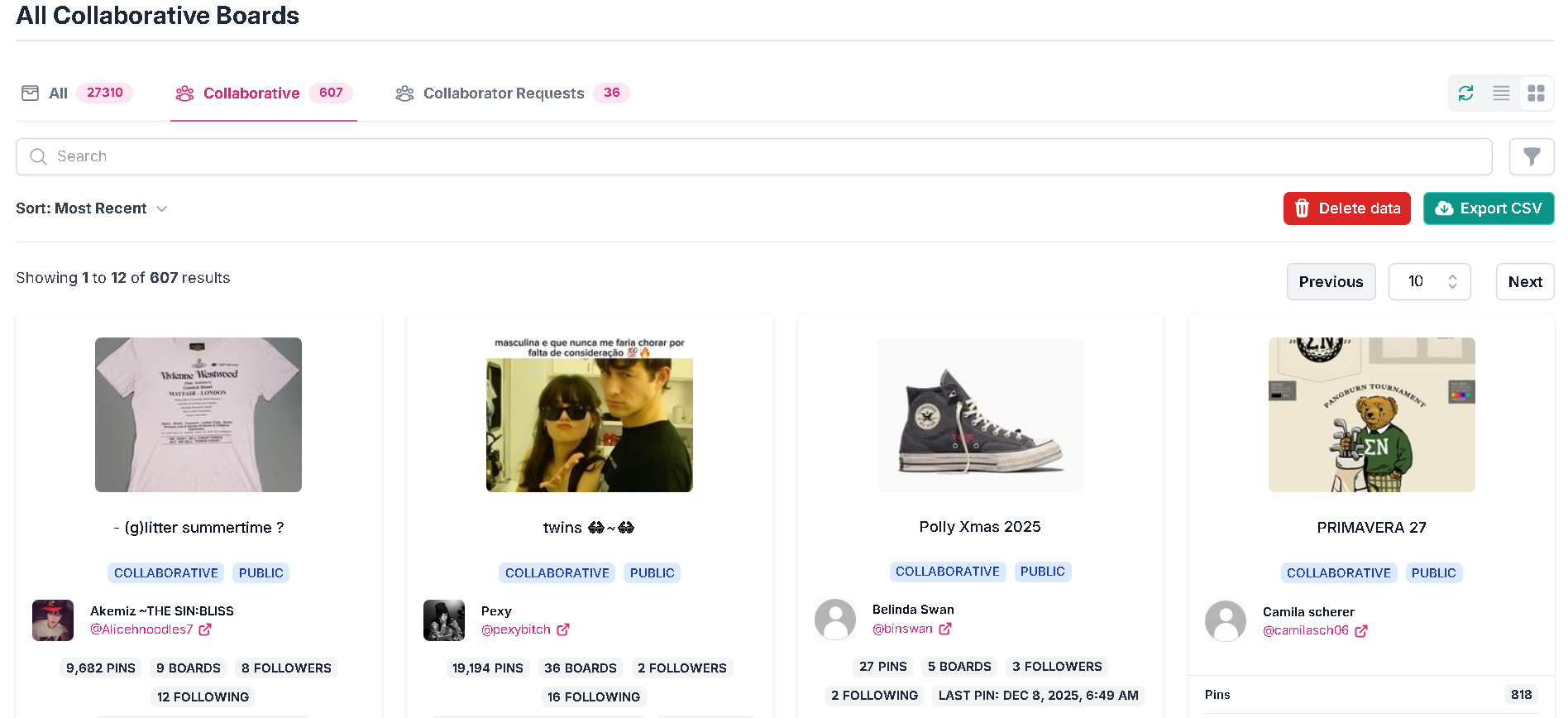
| 🤝 **Collaborative**         | ⭐ **Group boards only — this is your list**  |
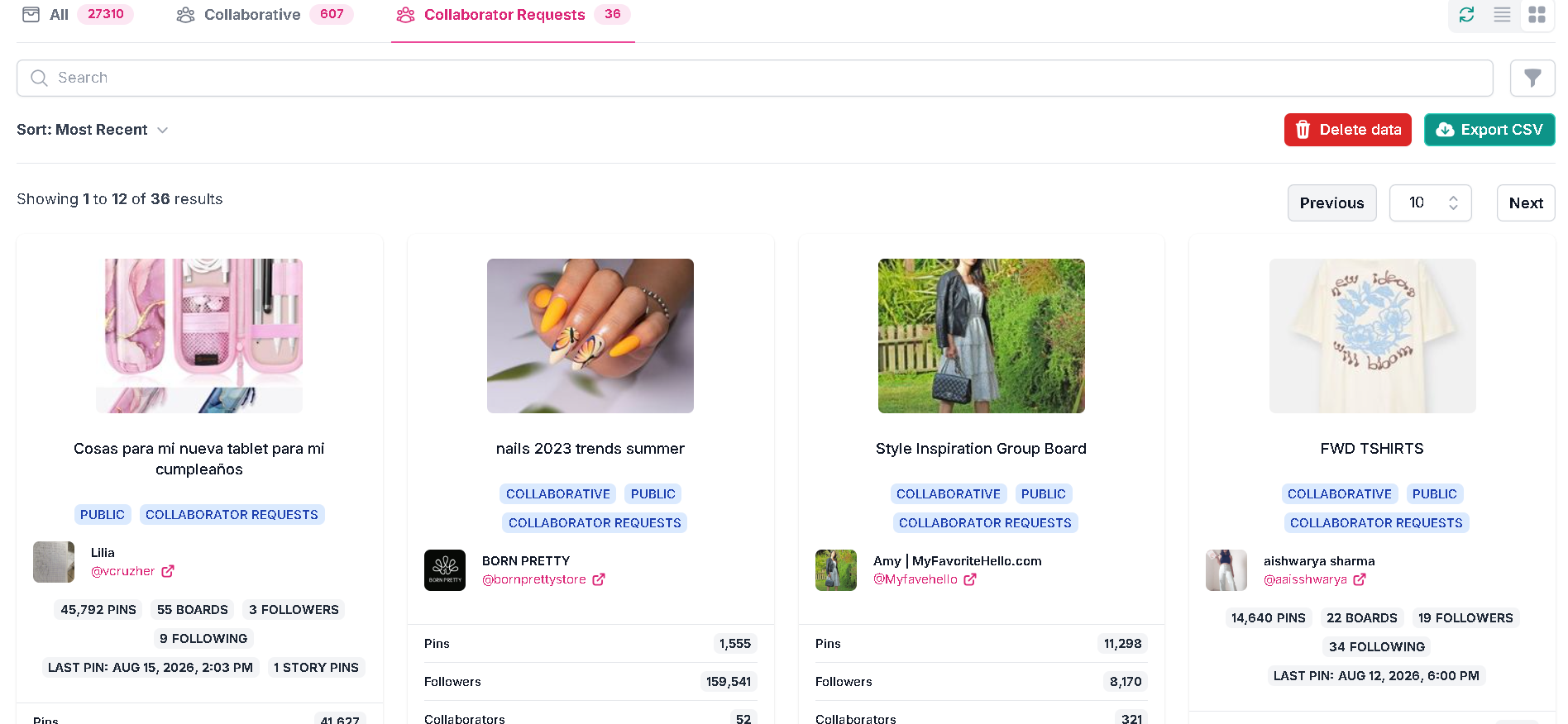
| 📨 **Collaborator Requests** | Boards openly accepting contributor requests |

<figure><img src="/files/z0CUn4DgodD6ZZai52BU" alt="Find Pinterest group boards with the SortPin Collaborative tab"><figcaption><p>The Collaborative tab filters thousands of collected boards down to group boards only</p></figcaption></figure>

**Step 4 — Sort and shortlist**

Use **Sort: Most Recent** to surface boards with current activity, then vet them with the checklist below. Export the shortlist with **Export CSV** if you're working through a lot of them.

> 📨 **Check Collaborator Requests first.** Those boards are actively looking for contributors, so your acceptance odds are far better than cold-messaging an owner who never advertised openings.

<figure><img src="/files/0vcaBCNTBQDLUvJRMHD4" alt="Pinterest group boards accepting collaborator requests"><figcaption><p>Collaborator Requests — boards whose owners have advertised that they want contributors</p></figcaption></figure>

<figure><img src="/files/2bGC6c88YBAcBEGJD01f" alt="Find collaborative Pinterest boards"><figcaption><p>Filtering collected boards down to collaborative ones</p></figcaption></figure>

### Method 2 — Search Pinterest manually

1. Search your niche keyword
2. Switch the results filter to **Boards**
3. Open boards and look for **multiple contributor avatars** near the board title — that's the group board signature
4. Check the board description for join instructions

### Method 3 — Follow the contributors

Once you find one good group board, open the profiles of its contributors. Active group pinners usually contribute to several boards in the same niche — their profiles are a shortcut to more.

### Method 4 — Search Google

```
site:pinterest.com "group board" your niche
```

Group board owners often put "group board", "contributors welcome", or join instructions in the description, which Google indexes.

***

## ✅ How to Tell a Good Group Board From a Dead One

This is the step most people skip — and it's the one that determines whether any of this is worth your time.

### Read the board card first

Each board in the dashboard shows the data you need to judge it without opening anything:

| Field on the card         | What to look for                                       |
| ------------------------- | ------------------------------------------------------ |
| 🕐 **Last pin**           | ⭐ The single most important field — recent means alive |
| 📌 **Pins**               | Board size and how much gets published                 |
| 👥 **Followers**          | Potential reach if the board is active                 |
| 🔓 **Public / Protected** | Protected boards restrict who can see or contribute    |
| 📅 **Modified at**        | When the board itself last changed                     |
| 👤 **Owner stats**        | Their pins, boards, followers, and last pin date       |

> 🕐 **Sort by Most Recent and check "Last pin" before anything else.** A board with 200,000 followers whose last pin was eight months ago is worth less to you than one with 3,000 followers pinning daily.

### The 5-point vetting checklist

| Check                     | Good sign                    | Red flag                           |
| ------------------------- | ---------------------------- | ---------------------------------- |
| 📅 **Recent activity**    | Last pin within days         | Last pin is months old             |
| 🎯 **Topical focus**      | Everything matches one theme | Random unrelated content           |
| 👥 **Contributor count**  | 5–50 active contributors     | 500+ (spam risk) or 1–2 (inactive) |
| 💾 **Engagement on pins** | Board pins show real saves   | Everything sits near zero          |
| 🚫 **Spam level**         | Curated, on-topic            | Repetitive affiliate spam          |

### Verify engagement, don't assume it

Follower count tells you almost nothing — many large boards were built years ago and are now dormant. What matters is whether **pins on that board still get saved**.

1. Open the board on Pinterest
2. Let SortPin collect its pins (enable **Pins Collection** for this step)
3. [Sort by saves](/pinterest-growth-and-analytics/how-to-sort-pinterest-pins-by-saves-date-and-popularity.md), then check **recent** pins specifically

**Interpreting what you find:**

| Pattern                        | Verdict                             |
| ------------------------------ | ----------------------------------- |
| Recent pins with healthy saves | ✅ Genuinely active — worth joining  |
| Only old pins perform well     | ⚠️ Declining — low priority         |
| Nothing performs, ever         | ❌ Dead — skip it                    |
| A few contributors dominate    | ⚠️ Clique; you may get little reach |

> 💡 **Ten vetted boards beat a hundred unvetted ones.** Being a contributor on a dead board costs you time and gains you nothing.

***

## ✉️ How to Get Accepted

Most group boards list their join process in the board description. The two common patterns:

### Pattern A — Follow, then request

1. **Follow the board owner** (usually the first avatar)
2. **Follow the board itself**
3. **Send the request** exactly as the description specifies — often an email or Pinterest message

### Pattern B — Comment on a pin

Some owners ask you to comment on a specific pin with your Pinterest username or email.

### Writing a request that gets accepted

Board owners get a lot of copy-pasted requests. Being specific and short beats being enthusiastic and generic.

**A workable structure:**

> Hi \[name] — I'd love to contribute to \[exact board name].
>
> I write about \[specific niche] at \[your site or profile], mostly \[format: tutorials / before-and-afters / recipes].
>
> My Pinterest is \[@username]. Happy to follow your posting rules on frequency and link policy.
>
> Thanks for considering it.

**What makes it work:**

| Do                                  | Don't                      |
| ----------------------------------- | -------------------------- |
| Name the exact board                | Send an obvious template   |
| State your specific niche           | Say "I post great content" |
| Link your profile so they can check | Make them go looking       |
| Acknowledge their rules             | Ignore stated requirements |
| Keep it under 5 lines               | Write three paragraphs     |

***

## 📋 Group Board Etiquette (Stay Invited)

Getting in is the easy part. Getting removed is easier.

1. **Read the rules first** — most boards cap daily pins and ban certain link types
2. **Don't flood** — 1–3 pins/day is plenty on most boards
3. **Repin others** — many boards require a save-for-save ratio
4. **Stay on topic** — off-topic pins are the #1 removal reason
5. **No aggressive affiliate spam** — the fastest route out
6. **Quality over quantity** — one strong pin outperforms ten filler ones

> 🛡️ Group board activity counts toward your overall pinning volume. Keep total daily pins within safe limits — see [How to grow Pinterest without getting locked](/faqs/how-to-grow-a-pinterest-account-without-getting-locked.md).

***

## 🚀 If You Can't Get Accepted — Start Your Own

Sometimes faster than waiting on replies.

1. Create a board with a **clear, searchable name**
2. Write a description that states the topic and the contribution rules
3. Fill it with **30–50 quality pins** first (nobody joins an empty board)
4. Invite 5–10 creators you already interact with
5. Grow it deliberately — a focused board of 15 active contributors beats a chaotic one of 200

***

## ❓ FAQs

**Q: How do I find Pinterest group boards to join?** A: Browse your niche with SortPin's Boards Collection enabled, then open the Boards dashboard and click the **Collaborative** tab — it filters your collected boards down to group boards only. The **Collaborator Requests** tab narrows it further to boards openly seeking contributors.

**Q: How can I find group boards that are actually accepting contributors?** A: Use the **Collaborator Requests** tab in the SortPin Boards dashboard. Those owners have advertised that they want contributors, so acceptance rates are much higher than cold outreach.

**Q: Are Pinterest group boards still worth it?** A: Less than they used to be, but yes for active, niche-focused boards. Pinterest now weighs individual pin performance heavily, so a dead board with 100k followers does nothing for you.

**Q: How can I tell if a group board is active?** A: Check the **Last pin** date on the board card in the SortPin dashboard — it's the fastest activity signal. Then confirm recent pins are still getting saves. Follower count alone is misleading, since many large boards are dormant.

**Q: How do I ask to join a Pinterest group board?** A: Follow the instructions in the board description exactly — usually follow the owner, follow the board, then message or email. Keep the request short and specific about your niche.

**Q: How many group boards should I join?** A: Quality over quantity. Five to ten genuinely active, on-topic boards outperform fifty dead ones and are far easier to contribute to properly.

**Q: Can I create my own Pinterest group board?** A: Yes. Create a board, then invite collaborators from the board settings. Fill it with 30–50 good pins before inviting anyone.

**Q: Why was I removed from a group board?** A: Usually off-topic pins, exceeding the daily limit, or ignoring the link policy. Re-read the rules before asking to rejoin.

**Q: Do group boards hurt my Pinterest account?** A: Only if you pin too aggressively or the board is full of spam. Vet boards before joining and keep your total daily pinning within [safe limits](/faqs/how-to-grow-a-pinterest-account-without-getting-locked.md).

***

## 👉 Related Guides

* [📊 How to Sort Pinterest Pins by Saves](/pinterest-growth-and-analytics/how-to-sort-pinterest-pins-by-saves-date-and-popularity.md)
* [📈 How to See Repin & Save Counts](/pinterest-growth-and-analytics/how-to-see-pinterest-pin-repin-and-save-counts.md)
* [🛡️ How to Grow Pinterest Without Getting Locked](/faqs/how-to-grow-a-pinterest-account-without-getting-locked.md)
* [🥳 Overview of Key Features](/getting-started/overview-of-key-features.md)

{% hint style="info" %}
💬 **Struggling to get accepted?** Our [chat support](https://go.crisp.chat/chat/embed/?website_id=48b6c12a-2212-4be1-9e27-2dad7e2d5fb0) team is happy to look at your niche and suggest an approach.
{% endhint %}