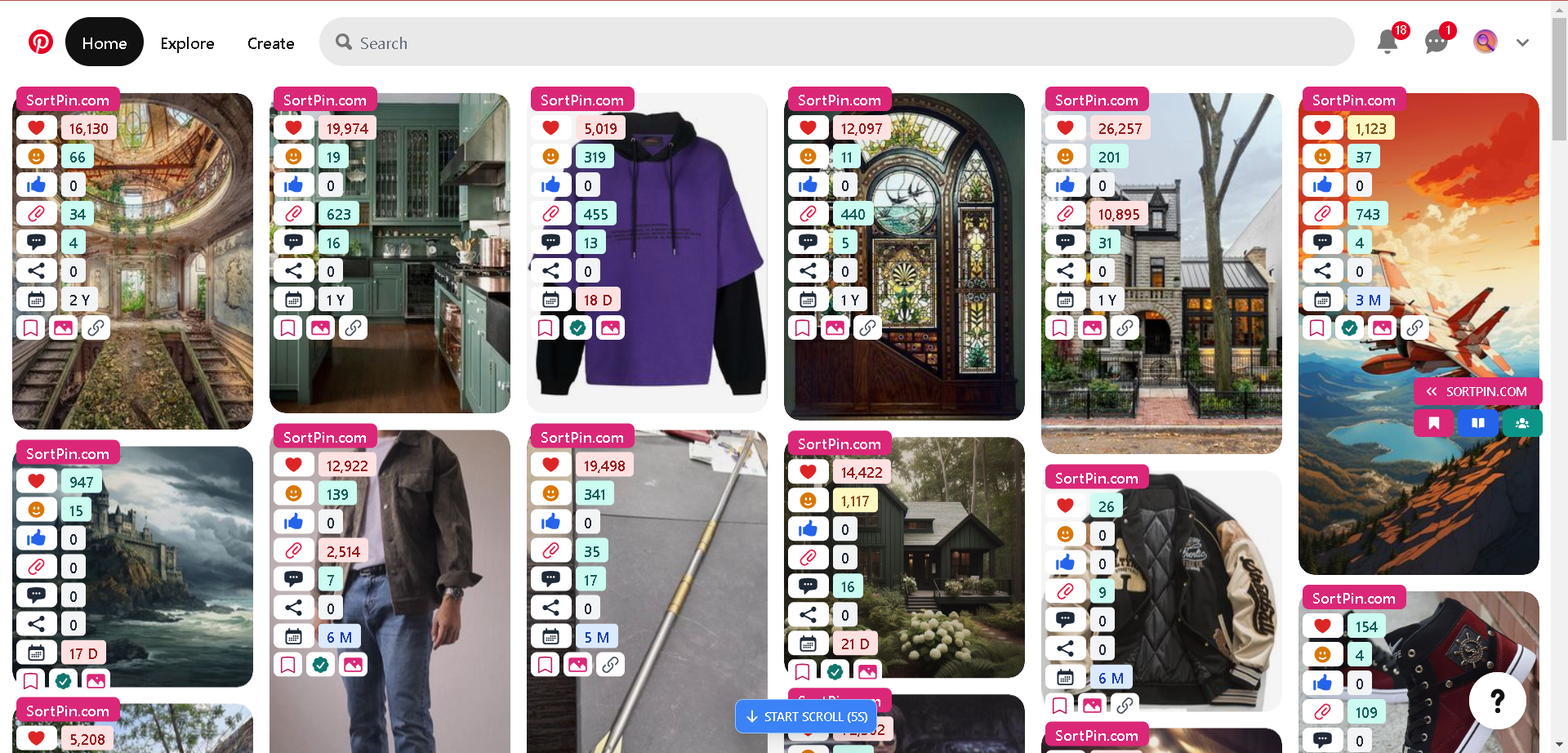
> For the complete documentation index, see [llms.txt](https://help.sortpin.com/llms.txt). Markdown versions of documentation pages are available by appending `.md` to page URLs; this page is available as [Markdown](https://help.sortpin.com/pinterest-growth-and-analytics/how-to-see-pinterest-pin-repin-and-save-counts.md).
# How to See Pinterest Repin & Save Counts (Hidden Stats)
Pinterest hides pin save and repin counts. Here's how to see real engagement data on any pin, what the numbers mean, and how to use them for research.
{% hint style="success" %}
**Pinterest stopped showing save counts publicly years ago** — which makes it very hard to tell a genuinely popular pin from one that just looks polished. This guide shows you how to surface those numbers and, more importantly, how to read them correctly.
{% endhint %}
> 🎉 **Trusted by 40,000+ Pinterest users worldwide** — engagement data is the #1 reason people install SortPin.
## 🎯 Why Pinterest Hides These Numbers
Pinterest's feed is designed around discovery, not analytics. Public counts encourage people to chase popular content instead of exploring — so Pinterest removed them from the standard pin view.
The practical consequence for anyone doing research:
| Without engagement data | With engagement data |
| ------------------------------- | ------------------------------------------- |
| You guess what's working | You can verify what's working |
| Polished ≠ popular is invisible | You see the difference immediately |
| Niche validation is a gamble | You measure real demand |
| Competitor study is superficial | You see which of their pins actually landed |
***
## 🔍 How to See Save & Repin Counts
### Step 1 — Install SortPin
[**Install the extension →**](https://sortpin.com) (free, \~30 seconds). Detailed steps: [How to install SortPin](/getting-started/how-to-install-sortpin.com-extension.md).
### Step 2 — Open any Pinterest page
A search result, a board, or an individual pin all work.
### Step 3 — Open the SortPin panel
Click the SortPin icon in your toolbar. Make sure the toggle is **on** — data won't display otherwise.
### Step 4 — Read the pin data
For pins on the page, SortPin surfaces:
### Pin engagement
| Metric | What it tells you |
| ----------------- | ----------------------------------------------------------- |
| 💾 **Saves** | Total direct + indirect saves the original content received |
| 🔄 **Repins** | Direct shares of this specific pin |
| ❤️ **Reactions** | Reaction counts |
| 👍 **Likes** | Like counts |
| 💬 **Comments** | Comment volume |
| ↗️ **Shares** | Times the pin was shared off-platform |
| 📅 **Created at** | Age of this pin |
### Creator context
| Metric | Why it matters |
| -------------------- | ---------------------------------------------------------- |
| 👥 **Followers** | Audience size — use it to normalise the engagement numbers |
| ➕ **Following** | Helps spot engagement-farming accounts |
| 📌 **Pins / Boards** | How prolific and how organised the account is |
| 📈 **Reach** | How many people the account's content reached |
| 👁️ **Views** | Total content views |
| 📖 **Story pins** | Whether they publish multi-frame content |
| 🕐 **Last pin** | Whether the account is still active |
### Source signals
| Signal | What it reveals |
| ------------------------- | ------------------------------------------------- |
| 🔗 **Destination domain** | Where the pin actually leads |
| 🏷️ **Upload type** | Manually uploaded vs bulk catalogue upload |
| ✨ **AI badge** | Whether Pinterest flagged the pin as AI-generated |
| ✅ **Verified badge** | Whether the creator is verified |
> 💡 **Upload type is an underrated filter.** Bulk catalogue uploads are automated product feeds — very different from a creator who deliberately made and posted something. When you're studying what works, you usually want the latter.
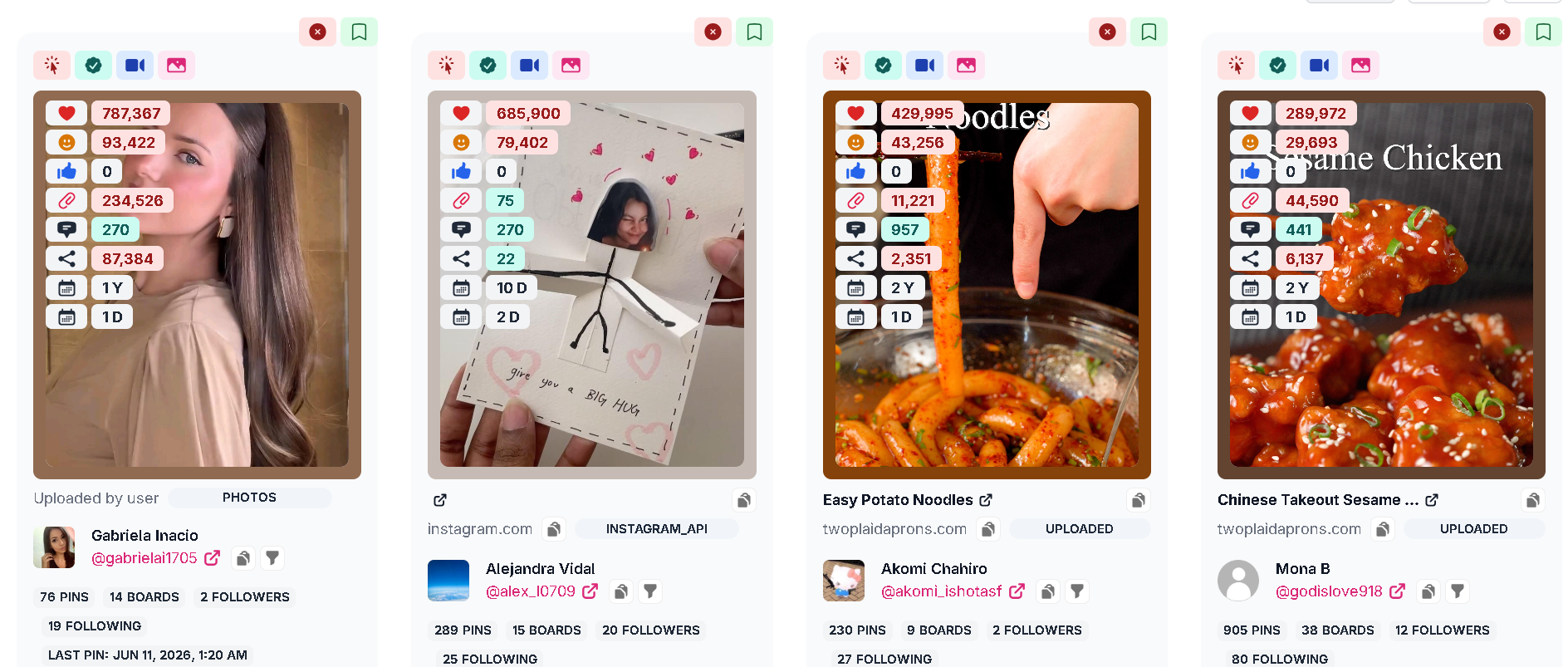
Hidden pin data surfaced on a Pinterest page
A single pin card — saves, reactions, likes, repins, comments, shares, age, and the creator's full stats
***
## 🧠 Saves vs Repins — The Distinction That Matters
These two numbers are constantly confused, and confusing them leads to bad decisions.
| Metric | Definition | What high numbers mean |
| ------------- | ---------------------------------------------------------------- | ---------------------------------------------- |
| 💾 **Saves** | Total direct **and** indirect shares the original content earned | The underlying content has durable appeal |
| 🔄 **Repins** | Direct shares of **this specific pin URL** | This particular upload is gaining traction now |
### Why the same image can show different numbers
When someone repins content, Pinterest creates a **new pin with a new URL and a fresh creation date** — but the image, title, description, and comments carry over from the original.
That's why you'll see comments dated *before* a pin's creation date. It isn't a bug.
👉 Full explanation: [Why the pin creation date differs from the comments](/the-reason-the-pin-creation-date-differs-from-the-comment.md)
### Which should you optimise for?
**Saves.** Saves reflect content that people wanted to keep — which is what Pinterest's distribution rewards over the long run. A pin with 12,000 saves and 40 repins is a stronger signal than one with 200 saves and 200 repins.
***
## 📈 How to Read the Numbers Properly
Raw counts mislead if you read them without context. Check these four things:
### 1. Age of the pin
A 4-year-old pin with 5,000 saves accumulated slowly. A 3-month-old pin with 5,000 saves is *far* more interesting. Always check the date alongside the count.
### 2. Creator follower count
10,000 saves from an account with 2 million followers is unremarkable. The same 10,000 from an account with 3,000 followers means the **content** did the work, not the audience. That's the pattern worth copying.
### 3. Destination quality
Open the link. A high-save pin pointing at a dead page or a generic aggregator tells you there's **unmet demand** for that topic — a gap you could fill properly.
### 4. Consistency across the niche
One outlier proves nothing. If three or four unrelated pins share the same angle and all have strong saves, that's a pattern.
| Signal | Interpretation | What to do |
| ---------------------------- | ---------------------- | ----------------------- |
| High saves, small account | Content-driven success | Study the angle closely |
| High saves, huge account | Reach-driven | Weight it lower |
| High saves, dead destination | Unmet demand | Build the better answer |
| High saves, very old pin | Evergreen topic | Worth a fresh take |
| Strong saves across 3+ pins | Real pattern | Test it |
***
## 🔬 Using This for Competitor Research
Engagement data turns vague competitor "inspiration" into something you can actually measure.
### A practical workflow
1. **Open the competitor's profile** or a board of theirs
2. **Scan the page with SortPin** so pin data is collected
3. **Sort by saves** — see [how to sort pins](/pinterest-growth-and-analytics/how-to-sort-pinterest-pins-by-saves-date-and-popularity.md)
4. **Look at their top 10, not their newest 10** — recency is not performance
5. **Note what the winners share** — format, promise, colour, title structure
6. **Check follower count** to separate content quality from audience size
7. **Write your own version** — never copy their assets or copy
> ⚖️ **Research ≠ copying.** Studying what performs is normal competitive research. Reusing someone's photography or text is a copyright problem. See [Is it legal & safe to download from Pinterest](/download-guides-troubleshooting-and-info/is-it-legal-safe-to-download-pinterest.md).
### What to record
| Field | Why |
| ----------------- | ---------------------------------------------------- |
| Pin URL | So you can revisit |
| Saves | The core signal |
| Date | Distinguishes fast growth from age |
| Creator followers | Normalises the number |
| Reach / views | Shows distribution beyond saves |
| Format | Infographic, photo, before/after, list |
| Destination | Blog, shop, dead link |
| Upload type | Separates deliberate posts from bulk catalogue feeds |
Rather than doing this by hand, use **Export CSV** from the dashboard and work in a spreadsheet — see [bulk collection & export](/download-guides-troubleshooting-and-info/bulk-download-pinterest.md).
> 🎯 **Filter out ads first.** The dashboard's **Promoted** tab shows which pins in your sample are paid placement. Excluding them gives a much cleaner read of organic performance.
***
## 🛠️ Troubleshooting
### "I don't see any numbers on pins"
Open the SortPin panel → click the 🏠 home icon → make sure the toggle is **on**, then refresh Pinterest. Full steps: [SortPin not working](/faqs/if-sortpin-is-not-working-despite-being-installed-what-should-i-do.md).
### "Some pins show data but others don't"
Pinterest doesn't expose the same fields for every pin. Promoted pins, very new pins, and some content types carry less data.
### "The numbers seem too low for a popular pin"
Check whether you're looking at **repins** (this pin only) rather than **saves** (the original content). A viral image reposted by 500 accounts splits its repins across all of them.
### "Data loads slowly on big boards"
Locally stored data accumulates. Clear it periodically: [How to clear cache](/faqs/how-to-clear-cache-to-speed-up-the-sortpin.com-extension.md).
***
## ❓ FAQs
**Q: How do I see how many saves a Pinterest pin has?** A: Install SortPin, open the pin or a page containing it, and open the SortPin panel — save counts appear alongside repins, reactions, and the creator's follower count.
**Q: Why did Pinterest remove public save counts?** A: Pinterest hasn't given a detailed public explanation. Practically, hiding counts keeps the feed discovery-focused rather than popularity-focused.
**Q: What's the difference between saves and repins on Pinterest?** A: Saves count the total direct and indirect shares the original content earned. Repins count direct shares of that one specific pin URL. Saves are the better long-term quality signal.
**Q: Can I see save counts on my own pins?** A: Yes — your own analytics are available in Pinterest's native Analytics for a business account. SortPin is for seeing engagement on **other people's** pins.
**Q: Is a pin with more saves always better to copy?** A: No. Always normalise by pin age and creator follower count. High saves from a huge account often reflect reach, not content quality.
**Q: Can I export Pinterest pin stats to a spreadsheet?** A: Yes. Scan a board or search page, then export the collected data to CSV. See [bulk download & export](/download-guides-troubleshooting-and-info/bulk-download-pinterest.md).
**Q: Does viewing pin data affect my Pinterest account?** A: No. SortPin reads what's already rendered in your browser. Ban risk comes from acting too quickly — see [safe growth limits](/faqs/how-to-grow-a-pinterest-account-without-getting-locked.md).
**Q: Why does a pin show comments older than its creation date?** A: Because it's a repin — the new pin inherits the original's comments while getting a new URL and date. See [the full explanation](/the-reason-the-pin-creation-date-differs-from-the-comment.md).
***
## 👉 Related Guides
* [📉 Pinterest 0 Views & Impressions — What's Actually Happening](/pinterest-growth-and-analytics/pinterest-zero-views-impressions.md)
* [📊 How to Sort Pinterest Pins by Saves, Date & Popularity](/pinterest-growth-and-analytics/how-to-sort-pinterest-pins-by-saves-date-and-popularity.md)
* [📈 Pinterest Trends & Predicts — Spot Topics Early](/pinterest-growth-and-analytics/how-to-find-pinterest-trends-before-they-go-viral.md)
* [🔍 Pinterest Keyword Research](/pinterest-growth-and-analytics/how-to-do-pinterest-keyword-research.md)
* [🧐 Why Pin Creation Date Differs From Comments](/the-reason-the-pin-creation-date-differs-from-the-comment.md)
{% hint style="info" %}
💬 **Not sure how to read your data?** Send our [chat support](https://go.crisp.chat/chat/embed/?website_id=48b6c12a-2212-4be1-9e27-2dad7e2d5fb0) team an example and we'll walk through it.
{% endhint %}