> For the complete documentation index, see [llms.txt](https://help.sortpin.com/llms.txt). Markdown versions of documentation pages are available by appending `.md` to page URLs; this page is available as [Markdown](https://help.sortpin.com/pinterest-growth-and-analytics/how-to-sort-pinterest-pins-by-saves-date-and-popularity.md).

# How to Sort Pinterest Pins by Saves, Date & Popularity

{% hint style="success" %}
**Pinterest gives you an infinite feed and no sort button.** For casual browsing that's fine. For research it's a serious limitation — you can't tell a 10,000-save pin from a 12-save pin without opening every one. Here's how to fix that.
{% endhint %}

> 🎉 **Trusted by 40,000+ Pinterest users worldwide** — sorting is the feature the name "SortPin" comes from.

## ❌ What Pinterest Doesn't Let You Do

| Sort you want             | Available natively? |
| ------------------------- | ------------------- |
| Most saved first          | ❌ No                |
| Newest first              | ❌ No                |
| Oldest first              | ❌ No                |
| Most commented            | ❌ No                |
| By creator follower size  | ❌ No                |
| Filter out low performers | ❌ No                |

Pinterest offers filters for *pin type* and some visual attributes, but nothing that ranks by performance. Everything is fed to you by the recommendation algorithm's logic, not yours.

***

## ✅ How Sorting Works With SortPin

The key concept: SortPin **collects** pin data as you browse, then lets you order that collection however you want.

### Step 1 — Install SortPin

[**Install the extension →**](https://sortpin.com). Guide: [How to install SortPin](/getting-started/how-to-install-sortpin.com-extension.md).

### Step 2 — Open the page you want to analyse

Any of these work:

* A **search results** page (`pinterest.com/search/pins/?q=...`)
* A **board**
* A **profile**
* Your own **saved pins**

### Step 3 — Let Smart Collect gather the data

SortPin's **Smart Collect** captures pin data **automatically as you browse** — you don't have to start anything per page.

Check it's enabled: SortPin panel → **Collect** tab → **Smart Collect** → make sure **Pins Collection** is on.

> ⚡ **Only turn on what you need.** Smart Collect has separate toggles for Pins, Boards, and Pinners. Collecting all three when you only need pins makes your dashboard slower for no benefit — see [why](/displaying-data-slowly.md#-the-best-long-term-fix-collect-only-what-you-need).

### Step 4 — Scroll the page (manually or automatically)

Data is captured as Pinterest loads pins, so the page has to be scrolled. Two options:

| Option                  | How                                                                                                           |
| ----------------------- | ------------------------------------------------------------------------------------------------------------- |
| 🖱️ **Scroll yourself** | Just browse normally — collection happens in the background                                                   |
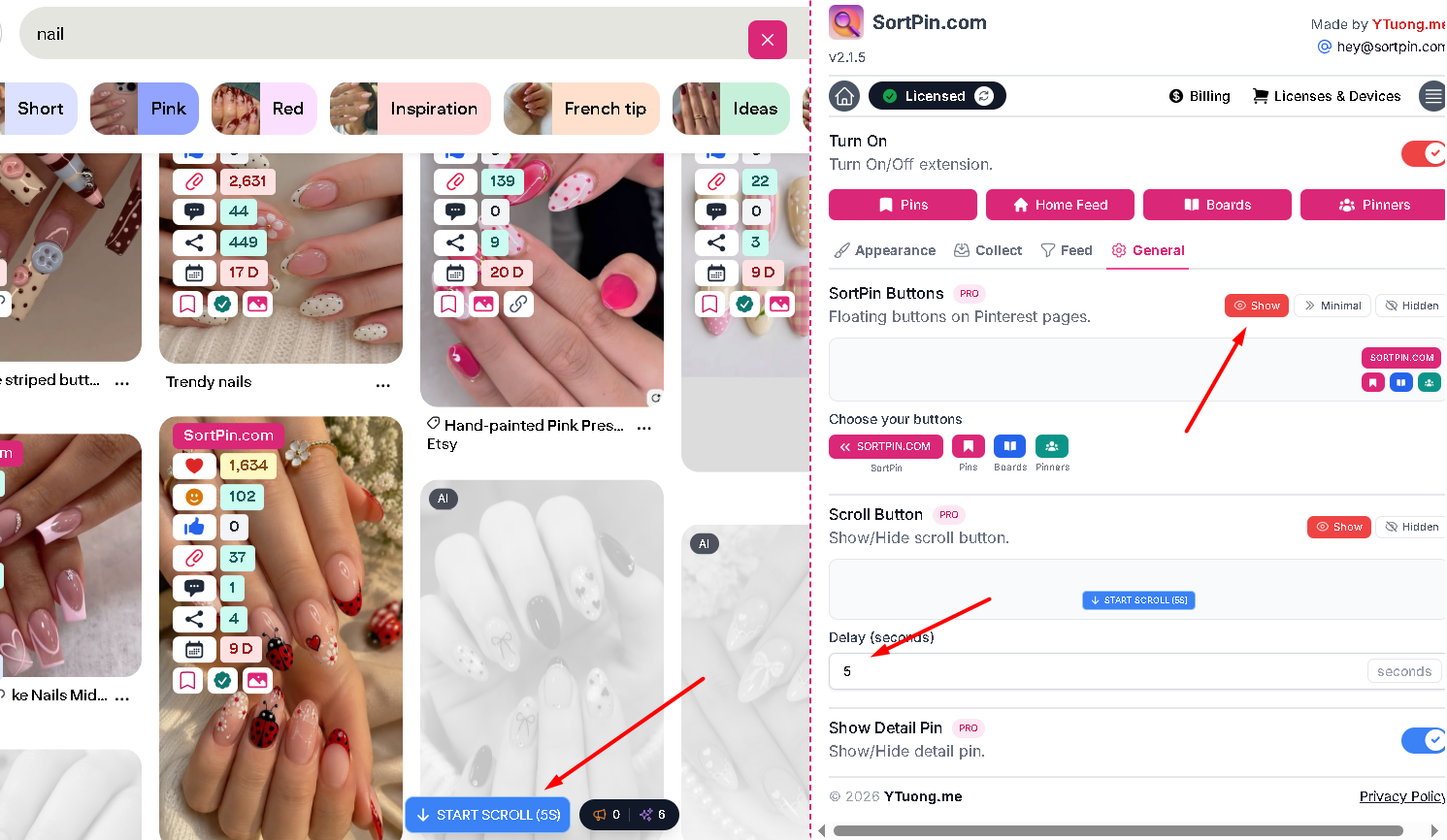
| ⚙️ **Scroll Button**    | SortPin panel → **General** tab → enable **Scroll Button**, then click **Start Scroll** on the Pinterest page |

The Scroll Button auto-scrolls with a **configurable delay** (set in seconds in the General tab). It mimics normal browsing rather than hammering the page.

**Choosing a delay:**

| Delay          | Suits                                   |
| -------------- | --------------------------------------- |
| \~5s (default) | Everyday browsing and small collections |
| 8–12s          | Large sessions of several hundred pins  |
| 15–20s         | If Pinterest starts throttling you      |

<figure><img src="/files/7r6XY2DWBGuwsrlYs9VC" alt="SortPin auto-scroll button and delay setting for collecting Pinterest pins"><figcaption><p>General tab — enable the Scroll Button and set how many seconds to wait between scrolls</p></figcaption></figure>

> ⏱️ **Longer is safer, not slower overall.** Pinterest rate-limits fast activity, and a throttled session collects nothing. See [safe usage limits](/faqs/how-to-grow-a-pinterest-account-without-getting-locked.md).

### Step 5 — Open the dashboard and sort

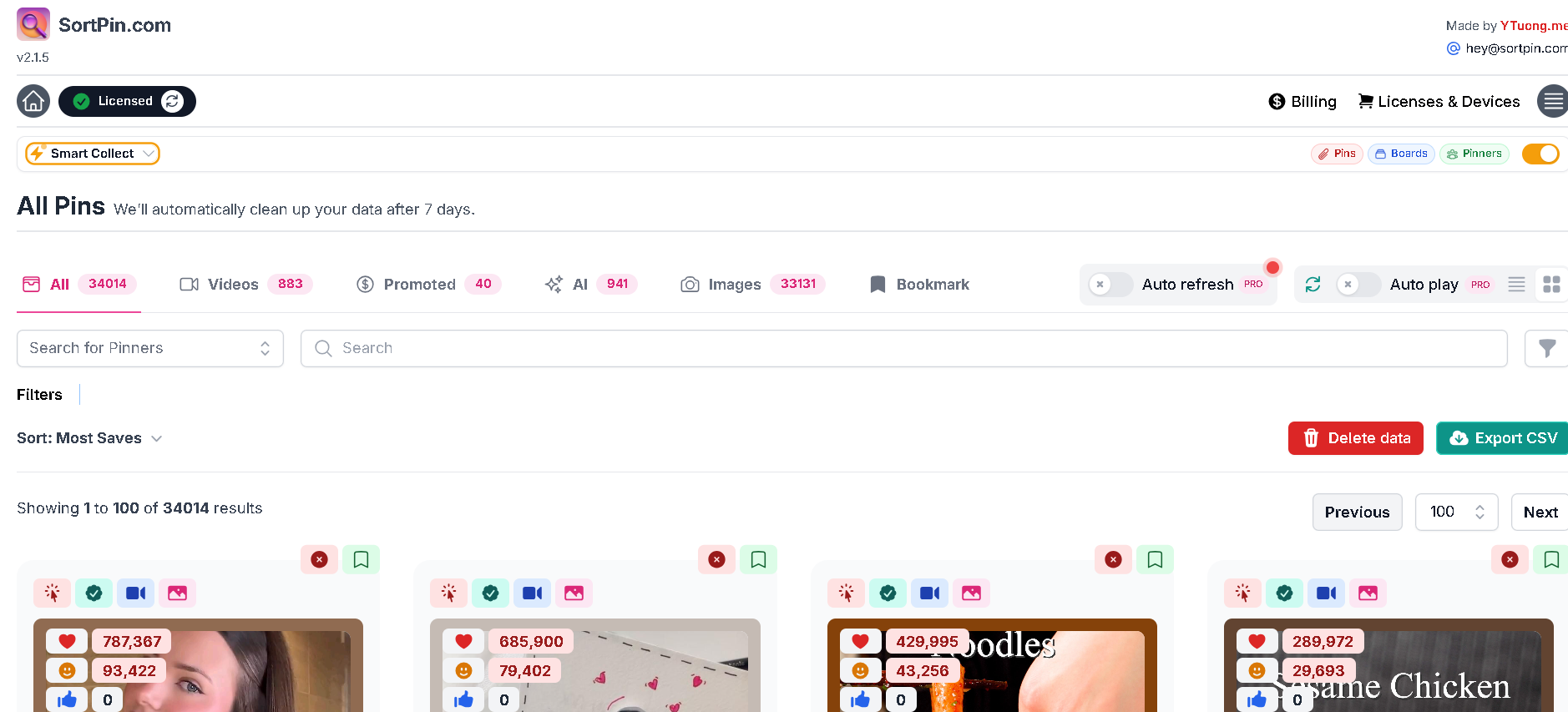
Open the SortPin dashboard and go to **All Pins**. Filter first, then sort:

| Filter tab      | Shows                                        |
| --------------- | -------------------------------------------- |
| 📋 **All**      | Everything collected                         |
| 🎬 **Videos**   | Video pins only                              |
| 💲 **Promoted** | Ads only — useful to *exclude* from research |
| ✨ **AI**        | Pins flagged as AI-generated                 |
| 🖼️ **Images**  | Static images only                           |
| 🔖 **Bookmark** | Pins you saved inside SortPin                |

<figure><img src="/files/OCat0RnW8rtv9QIKrZg6" alt="Sort Pinterest pins by saves in the SortPin All Pins dashboard"><figcaption><p>All Pins dashboard — filter tabs across the top, sort and CSV export below</p></figcaption></figure>

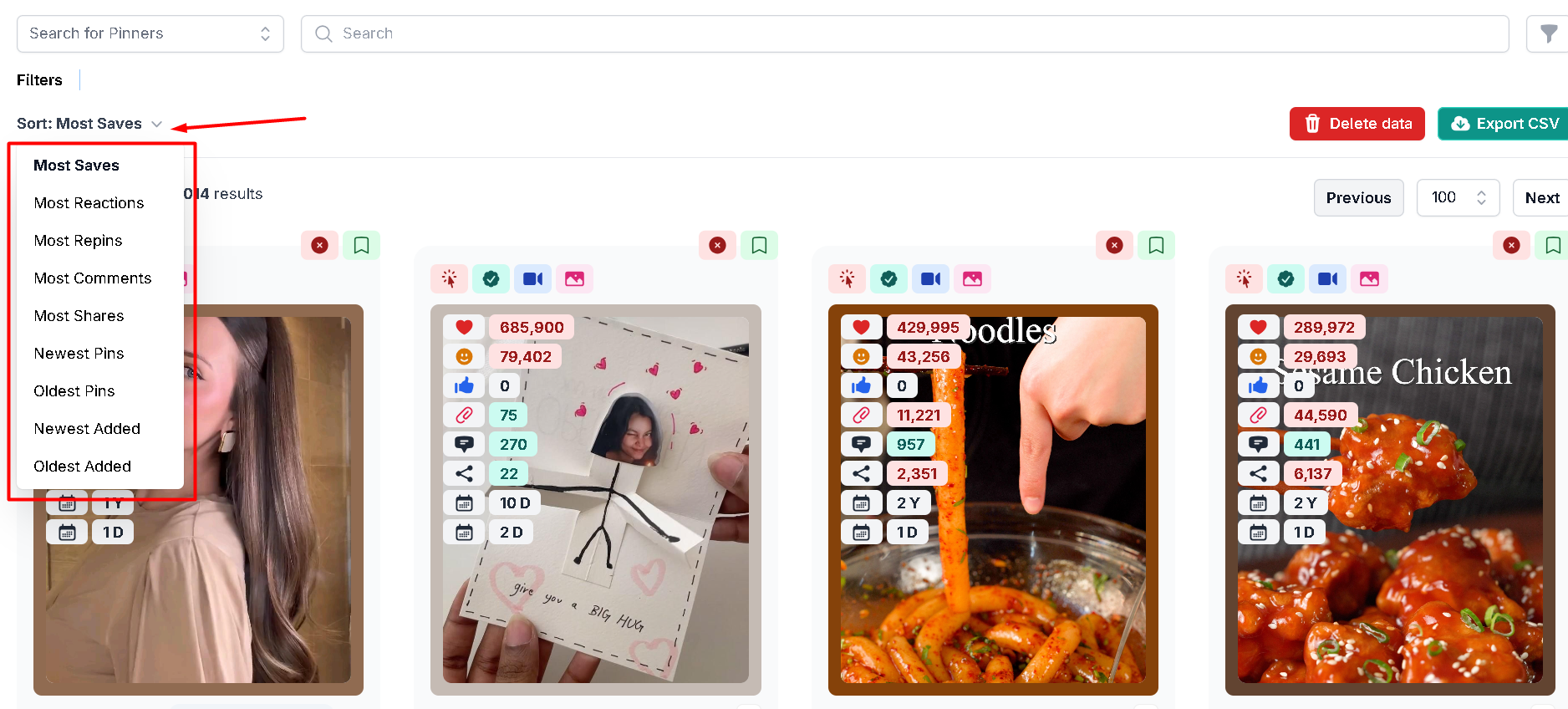
Then choose a sort order. Nine are available:

| Sort by               | Use it when                                           |
| --------------------- | ----------------------------------------------------- |
| 💾 **Most Saves**     | Finding what genuinely resonates — the default choice |
| 😊 **Most Reactions** | Gauging emotional response rather than intent to keep |
| 🔄 **Most Repins**    | Seeing which specific uploads spread furthest         |
| 💬 **Most Comments**  | Finding topics people have questions about            |
| ↗️ **Most Shares**    | Spotting content people send to others                |
| 🆕 **Newest Pins**    | Current momentum by pin publish date                  |
| 📜 **Oldest Pins**    | Evergreen content that has lasted                     |
| ⬇️ **Newest Added**   | Most recently collected by SortPin                    |
| ⬆️ **Oldest Added**   | Earliest in your collection                           |

> 💡 **"Pins" vs "Added" is a useful distinction.** *Newest Pins* sorts by when the pin was published on Pinterest. *Newest Added* sorts by when SortPin collected it — handy when you re-scan the same query over several weeks and want to see what's new since last time.

<figure><img src="/files/ccSkCIYT2unrM6sqcaiB" alt="Pinterest pin sorting options — most saves, repins, comments, shares"><figcaption><p>The full sort menu, including collection-time ordering</p></figcaption></figure>

> 🎯 **Research tip:** check the **Promoted** tab first to see how many ads are in your sample, then exclude them. Promoted pins are paid placement, not evidence of organic appeal — leaving them in distorts your read of the niche.

### Step 6 — Act on the top results

Open the top 10–20, check destination quality, and record the pattern. Use **Export CSV** if you want to work in a spreadsheet.

***

## 🎯 Four Sorting Workflows That Actually Pay Off

### Workflow 1 — Validate a niche before committing

1. Search your target topic
2. Collect \~200 pins
3. Sort by **saves**
4. Look at the top 20

**Read the result:**

| What you see                      | What it means                  |
| --------------------------------- | ------------------------------ |
| Several pins with very high saves | Real demand exists             |
| Everything clusters low           | Weak or very narrow niche      |
| Only huge accounts at the top     | Hard to break in without reach |
| Small accounts at the top         | Content quality can win here ✅ |

### Workflow 2 — Find what's working *right now*

1. Collect from your topic
2. Sort by **date**, newest first
3. Among recent pins, look for unusually strong saves

Recent + high saves = current momentum, not historical accumulation. This is the closest you get to a reliable trend signal.

### Workflow 3 — Audit a competitor honestly

1. Open their profile
2. Collect their pins
3. Sort by **saves**

Their top performers tell you far more than their latest posts. Most accounts publish steadily and win occasionally — you want the wins.

👉 Deeper method: [How to see repin & save counts](/pinterest-growth-and-analytics/how-to-see-pinterest-pin-repin-and-save-counts.md)

### Workflow 4 — Clean up your own boards

1. Open one of your boards
2. Collect and sort by **saves**
3. Identify pins that never performed

Low-performing pins dilute a board's topical focus. Pruning them tightens what the board signals about your account.

***

## 📤 Export for Deeper Analysis

For anything beyond a quick look, get the data into a spreadsheet.

After collection, export to **CSV** — you get pin URLs, titles, descriptions, save counts, and creator info in one file.

**What that unlocks:**

| In a spreadsheet you can     | Example                              |
| ---------------------------- | ------------------------------------ |
| Filter by threshold          | Show only pins above 5,000 saves     |
| Calculate saves-per-follower | Normalise for account size           |
| Group by format              | Compare infographics vs photos       |
| Track over time              | Re-scan monthly and diff the results |
| Share with a team            | Hand off a research file             |

👉 [Bulk collection & CSV export guide](/download-guides-troubleshooting-and-info/bulk-download-pinterest.md)

***

## 🛠️ Troubleshooting

### "Collection stops partway through"

Pinterest may be throttling the session. Wait 10–30 minutes, then restart with a longer scroll delay (15–20 seconds) in the **General** tab.

### "Nothing is being collected"

Check **Collect** tab → **Smart Collect** → **Pins Collection** is toggled on. Also confirm the master **Turn On** switch at the top of the panel is enabled.

### "Some pins have no save data"

Not every pin exposes the same fields. Promoted pins and very new pins often carry less. Sort on the ones that do.

### "Sorting is slow with lots of collected pins"

Everything is stored locally, so large archives get heavy. Clear old data between projects: [How to clear cache](/faqs/how-to-clear-cache-to-speed-up-the-sortpin.com-extension.md).

### "The same pin appears more than once"

Pinterest genuinely serves duplicate repins of the same image with different URLs. Deduplicate by image or title after export.

### "Results don't match what I see in the feed"

Expected — your feed is personalised. A search page collection is a much more neutral sample than your home feed.

***

## ❓ FAQs

**Q: Can you sort Pinterest pins by most saved?** A: Not natively — Pinterest has no sort control. With SortPin you collect pins from a page, then sort that collection by saves, date, comments, or creator size.

**Q: How do I sort a Pinterest board by date?** A: Open the board, run a SortPin collection, then sort by date. Pinterest itself doesn't offer board sorting.

**Q: How many pins can I collect at once?** A: There's no hard limit in SortPin. Practically, Pinterest may throttle very long sessions, so a few hundred pins per session is comfortable. Increase the scroll delay if you're going bigger.

**Q: Does sorting change anything on Pinterest?** A: No. Sorting happens on your device with data SortPin already collected. Nothing is altered on Pinterest.

**Q: Can I sort someone else's board?** A: Yes, as long as it's public (or private and shared with you). Open it and run a collection as normal.

**Q: Why does collection take so long?** A: Pinterest loads pins lazily and rate-limits fast activity, so the scroll delay is deliberate. You can shorten it in the **General** tab, but a throttled session collects nothing — slower is usually faster overall. See [safe growth limits](/faqs/how-to-grow-a-pinterest-account-without-getting-locked.md).

**Q: Do I have to start collection manually each time?** A: No. Smart Collect runs in the background whenever it's enabled — browsing Pinterest normally collects data. The Scroll Button just automates the scrolling for you.

**Q: Can I export sorted pins to Excel?** A: Yes — export to CSV, then open it in Excel, Google Sheets, or Numbers.

**Q: Is sorting available on mobile?** A: No, it needs the desktop extension. Mobile browsers don't support extensions. For mobile downloads use the [Telegram bot](/features/telegram-bot-pinterest-images-video-and-story-downloader.md).

***

## 👉 Related Guides

* [📈 How to See Pinterest Repin & Save Counts](/pinterest-growth-and-analytics/how-to-see-pinterest-pin-repin-and-save-counts.md)
* [🔍 Pinterest Sort Extension — Browser Support](/pinterest-growth-and-analytics/best-pinterest-sort-extension-for-chrome-and-firefox.md)
* [📦 Bulk Download & CSV Export](/download-guides-troubleshooting-and-info/bulk-download-pinterest.md)
* [📈 Pinterest Trends & Predicts](/pinterest-growth-and-analytics/how-to-find-pinterest-trends-before-they-go-viral.md)

{% hint style="info" %}
💬 **Working on a large research project?** Our [chat support](https://go.crisp.chat/chat/embed/?website_id=48b6c12a-2212-4be1-9e27-2dad7e2d5fb0) team can advise on safe pacing for big collections.
{% endhint %}