> For the complete documentation index, see [llms.txt](https://help.sortpin.com/llms.txt). Markdown versions of documentation pages are available by appending `.md` to page URLs; this page is available as [Markdown](https://help.sortpin.com/pinterest-guides/hide-pinterest-ads.md).
# How to Hide Pinterest Ads & Promoted Pins
Too many ads on Pinterest? Hide or dim promoted pins automatically with SortPin's Feed Cleanup — free, and it works as you scroll.
{% hint style="success" %}
**You can remove promoted pins from your Pinterest feed.** SortPin's **Feed Cleanup** detects promoted and ad pins and either hides them completely or fades them to 50%. Free, and it applies automatically as you browse.
{% endhint %}
> 🎉 **Trusted by 40,000+ Pinterest users worldwide** — "too many ads" is one of the most common complaints we hear.
## ⚡ The Fast Answer
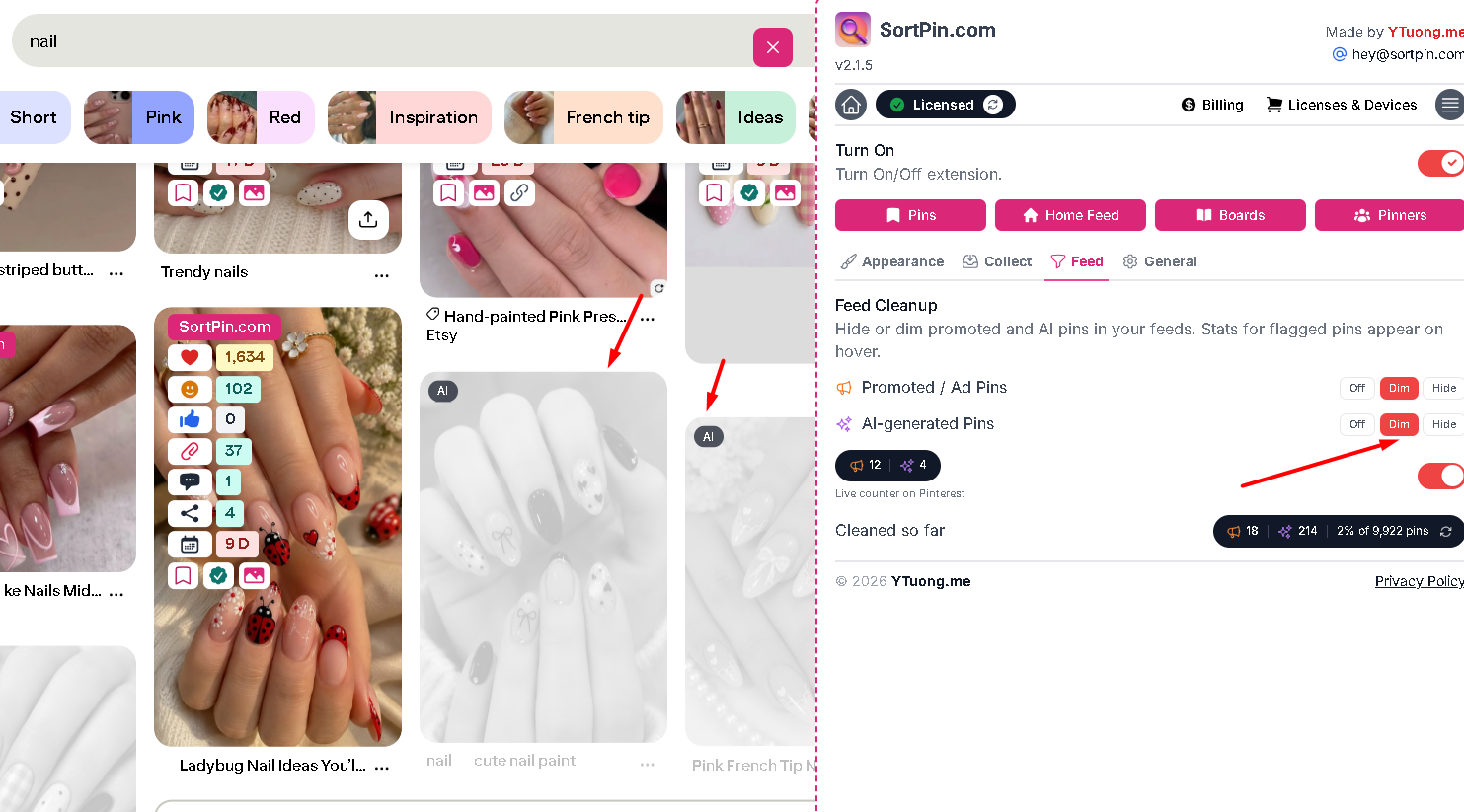
1. Open the **SortPin panel** on any Pinterest page
2. Go to the **Feed** tab
3. Under **Feed Cleanup**, set **Promoted / Ad Pins** to **Hide** or **Dim**
That's it. Promoted pins stop crowding your feed from the next page load.
Feed tab — set Promoted / Ad Pins to Hide or Dim, and watch the live counter
***
## 🧹 Hide vs Dim — Which to Choose
| Mode | What happens | Best for |
| -------- | --------------------------------------- | --------------------------- |
| **Off** | Ads appear normally | Default Pinterest behaviour |
| **Dim** | Ads fade to 50% — visible but recessive | Most people |
| **Hide** | Ads are removed from the feed entirely | Focused research sessions |
> 💡 **Dim is the sensible default.** Promoted pins are occasionally genuinely relevant, especially in shopping categories. Dimming keeps them available without letting them dominate.
### See how much you're actually skipping
Feed Cleanup keeps counters so you can see the scale of it:
| Counter | Shows |
| -------------------------------- | --------------------------------------------------- |
| 📊 **Live counter on Pinterest** | Flagged pins on the page you're viewing |
| 📈 **Cleaned so far** | Running total, plus the percentage of all pins seen |
Most people are surprised by the number. Seeing "X% of pins" quantified is very different from a vague sense that there are "a lot of ads lately".
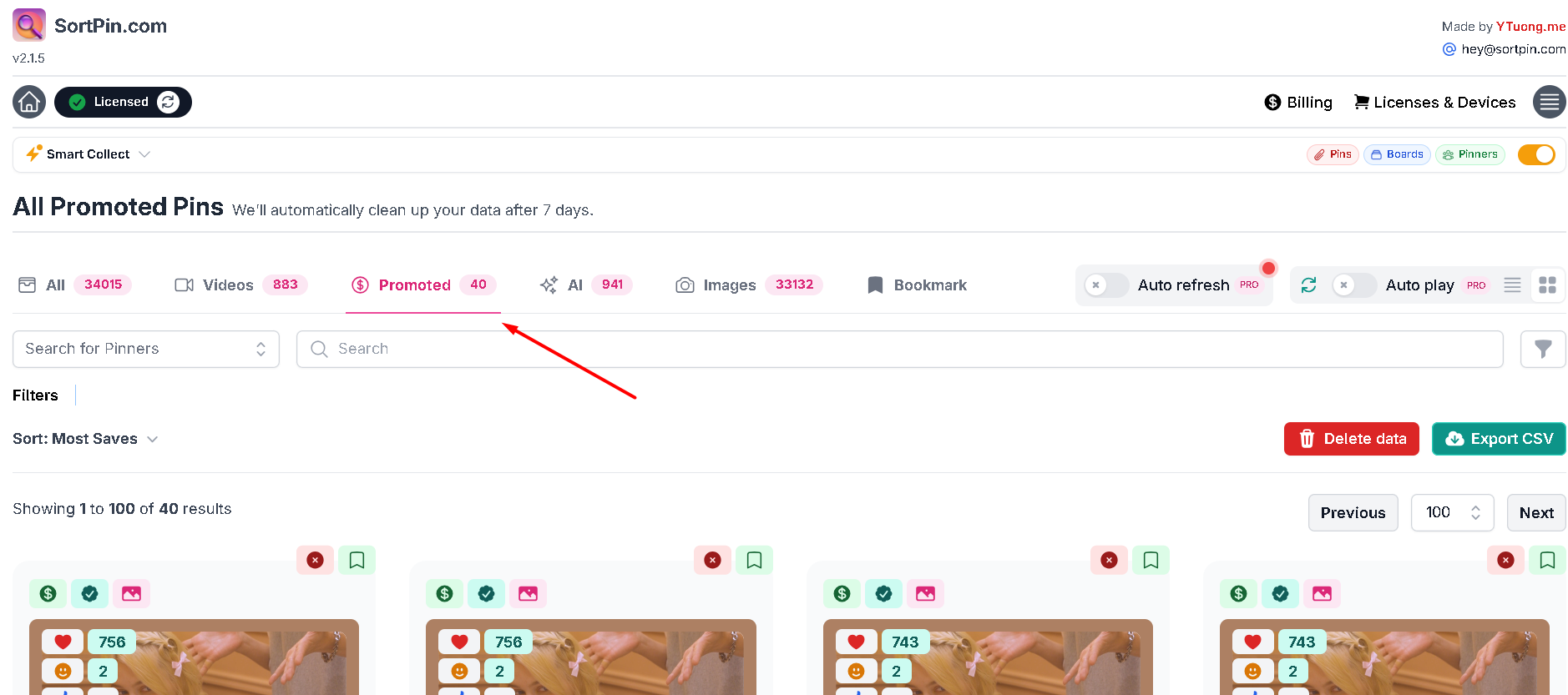
The Promoted tab shows exactly which pins in your feed were paid placements
***
## 🤔 Why Pinterest Feels Ad-Heavy
Pinterest is free and ad-supported, so promoted pins are how it makes money. Two things make them feel especially intrusive here:
| Factor | Effect |
| -------------------------------- | ----------------------------------------------------------------------------- |
| 🎭 **Ads look like normal pins** | Promoted pins use the same card format — you often don't register them as ads |
| 📈 **Ad load grows over time** | Ad-supported platforms generally increase density as they mature |
| 🛒 **High commercial intent** | Pinterest users are often mid-purchase-decision, so advertisers bid heavily |
| 🔁 **Repetition** | The same campaign following you across sessions |
That visual camouflage is the real friction. You're browsing for ideas and half the grid is trying to sell you something without announcing it.
***
## 🎯 Who Benefits Most
| Use case | Why it matters |
| ------------------------------------ | ------------------------------------------------ |
| 🎨 **Designers gathering reference** | Ads pollute moodboards with commercial imagery |
| 🔍 **Competitor research** | You want organic performance, not paid placement |
| 🛒 **Product research** | Ads skew what looks popular |
| 🧘 **Casual browsing** | Fewer interruptions while looking for ideas |
| 📊 **Anyone analysing a niche** | Promoted pins distort your sample |
> 📊 **For research specifically, this matters more than comfort.** If you're judging what performs in a niche, promoted pins are paid placement — not evidence of organic appeal. Filtering them out gives you a cleaner read. See [how to sort pins by saves](/pinterest-growth-and-analytics/how-to-sort-pinterest-pins-by-saves-date-and-popularity.md).
***
## 🧹 Clean Up AI Pins at the Same Time
The same Feed Cleanup panel has a second control for **AI-generated pins**, with the same Off / Dim / Hide options.
Many people run both:
| Setting | Result |
| ------------------------------ | -------------------------------------- |
| Ads → **Hide** + AI → **Hide** | Strictest — organic human content only |
| Ads → **Hide** + AI → **Dim** | Common balance |
| Ads → **Dim** + AI → **Dim** | Softest — nothing disappears |
👉 Full guide: [How to Hide AI-Generated Pins](/pinterest-guides/pinterest-ai-content-filter.md)
***
## ⚙️ What Pinterest Itself Lets You Do
Pinterest offers limited native control over ads:
| Option | Where | Effect |
| ------------------------------ | --------------------------- | ------------------------------- |
| 🚫 "Hide this ad" | Pin **⋯** menu | One pin at a time |
| 📉 Ad personalisation settings | Settings → Privacy and data | Changes targeting, not quantity |
| 🚩 Report an ad | Pin **⋯** menu | For policy violations |
> ⚠️ **Note the important limitation:** turning off ad personalisation makes ads *less relevant*, not *less frequent*. You'll see the same number — just worse-targeted ones. There is no native setting that reduces ad volume.
***
## 🛠️ Troubleshooting
### "Ads still appear after enabling Hide"
Settings apply as pins load, so refresh the page. Also confirm the SortPin **Turn On** switch at the top of the panel is enabled.
### "Some sponsored content isn't being hidden"
Feed Cleanup targets pins flagged as promoted. Organic pins from brands aren't ads in Pinterest's data, so they aren't filtered — they're regular pins that happen to be commercial.
### "My feed looks sparse now"
In high-commercial niches, a large share of the feed can be promoted. Switch to **Dim** so nothing disappears entirely.
### "Settings reset after reinstalling"
Feed Cleanup preferences are stored locally. Re-set them in the **Feed** tab after reinstalling.
### "It's not working on the mobile app"
Extensions can't run on mobile apps — this is a desktop browser feature. See [browser support](/pinterest-growth-and-analytics/best-pinterest-sort-extension-for-chrome-and-firefox.md#-browser-support).
***
## ❓ FAQs
**Q: How do I get rid of ads on Pinterest?** A: Open the SortPin panel → **Feed** tab → **Feed Cleanup** → set **Promoted / Ad Pins** to **Hide**. They stop appearing from the next page load.
**Q: Is there a Pinterest ad blocker?** A: SortPin's Feed Cleanup does this specifically for Pinterest — it recognises promoted pins and hides or dims them. Generic ad blockers often miss Pinterest's promoted pins because they're served in the same format as normal content.
**Q: Why does Pinterest have so many ads now?** A: Pinterest is free and ad-supported, and ad density on such platforms typically increases over time. Pinterest's high purchase intent also attracts heavy advertiser spending.
**Q: Can I hide Pinterest ads without an extension?** A: Not really. Pinterest's own controls let you hide individual ads or change targeting, but there's no setting that reduces how many you see.
**Q: Does hiding ads violate Pinterest's terms?** A: Feed Cleanup changes how pins are displayed in your own browser — it doesn't interact with Pinterest's systems or block ad requests at the network level. That said, ads fund the free service, so weigh that for yourself.
**Q: What's the difference between Hide and Dim for ads?** A: **Hide** removes promoted pins from the feed. **Dim** fades them to 50% so they're still visible but no longer compete for attention.
**Q: Does this work on Firefox?** A: Yes — the Firefox build has full feature parity with Chrome.
**Q: Can I hide ads on the Pinterest mobile app?** A: No. Mobile operating systems don't support browser extensions, so Feed Cleanup is desktop-only.
**Q: Will hiding ads affect my recommendations?** A: Feed Cleanup filters what's displayed to you; it doesn't send signals back to Pinterest. Your recommendations continue to be based on what you search and save.
***
## 👉 Related Guides
* [🤖 How to Hide AI-Generated Pins](/pinterest-guides/pinterest-ai-content-filter.md)
* [🔍 Pinterest Sort Extension — What It Does](/pinterest-growth-and-analytics/best-pinterest-sort-extension-for-chrome-and-firefox.md)
* [📊 How to Sort Pinterest Pins by Saves](/pinterest-growth-and-analytics/how-to-sort-pinterest-pins-by-saves-date-and-popularity.md)
* [🔄 Pinterest Alternatives Compared](/pinterest-guides/pinterest-alternatives.md)
{% hint style="info" %}
💬 **Seeing ads that slip through?** Tell our [chat support](https://go.crisp.chat/chat/embed/?website_id=48b6c12a-2212-4be1-9e27-2dad7e2d5fb0) team — examples help improve detection.
{% endhint %}