> For the complete documentation index, see [llms.txt](https://help.sortpin.com/llms.txt). Markdown versions of documentation pages are available by appending `.md` to page URLs; this page is available as [Markdown](https://help.sortpin.com/pinterest-troubleshooting/pinterest-dark-mode.md).

# How to Enable Pinterest Dark Mode

{% hint style="success" %}
**Pinterest offers dark mode in its mobile apps — but not on the desktop website.** That's the gap **PinDark** fills: a free extension with 11 night themes, 8 day themes, and custom colours, built specifically for Pinterest.
{% endhint %}

> 🎉 **Trusted by 40,000+ Pinterest users worldwide** — dark mode is the single most requested Pinterest feature.

## ⚡ Which Option Do You Need?

| You want                          | Use                                                                                          | Cost |
| --------------------------------- | -------------------------------------------------------------------------------------------- | ---- |
| 🎨 **Full dark mode with themes** | [**PinDark extension**](https://www.sortpin.com/pinterest-dark-mode)                         | Free |
| 🌓 **Simple light/dark toggle**   | Built into the [SortPin extension](/getting-started/how-to-install-sortpin.com-extension.md) | Free |
| 📱 **Dark mode on your phone**    | Pinterest app settings                                                                       | Free |

> 💡 **PinDark and SortPin are separate extensions from the same team.** Run both together — SortPin handles pin data and downloads, PinDark handles how Pinterest looks.

***

## 🎨 Method 1: PinDark — Full Themes (Recommended)

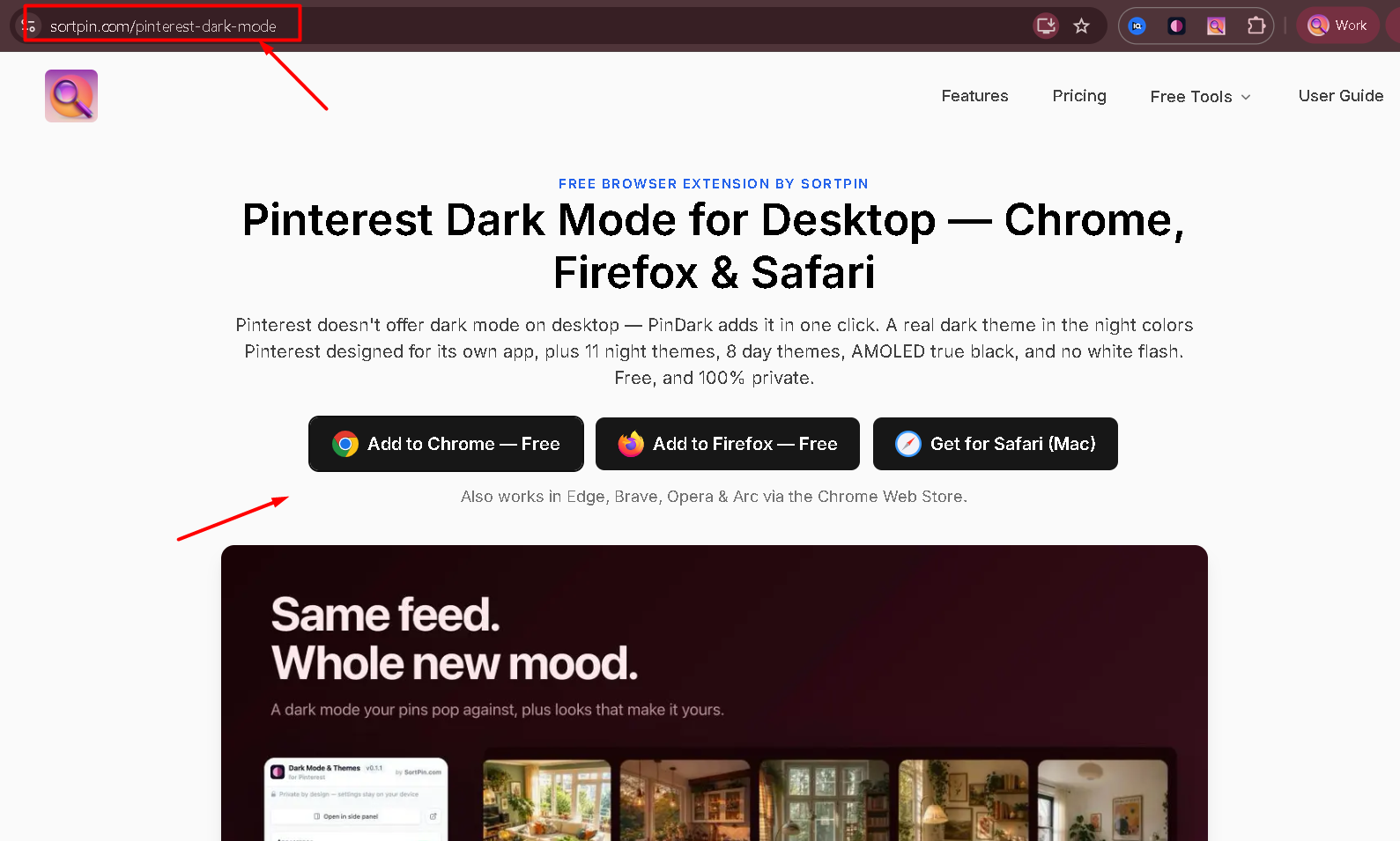
**PinDark** is a dedicated Pinterest dark mode extension. Unlike generic dark-mode extensions, it's built around Pinterest's own night colours rather than a blanket filter — so **your pin images stay exactly as they should look.**

👉 [**Get PinDark →**](https://www.sortpin.com/pinterest-dark-mode)

<figure><img src="/files/ac2uWEKpslGJbQO1wfkJ" alt="PinDark — Pinterest dark mode extension for Chrome, Firefox and Safari"><figcaption><p>PinDark adds the dark mode Pinterest never shipped on desktop — free, on all three browsers</p></figcaption></figure>

### Install links

| Browser                                         | Link                                                                                                                                                                                               |
| ----------------------------------------------- | -------------------------------------------------------------------------------------------------------------------------------------------------------------------------------------------------- |
| 🟢 **Chrome, Edge, Brave, Opera, Vivaldi, Arc** | [Chrome Web Store](https://chromewebstore.google.com/detail/dark-mode-for-pinterest-%E2%80%94/acgmkcgkegbgcdmhabifeigllicffkpb?utm_source=help.sortpin.com\&utm_medium=docs\&utm_campaign=pindark) |
| 🦊 **Firefox**                                  | [Firefox Add-ons](https://addons.mozilla.org/en-US/firefox/addon/dark-mode-for-pinterest-themes/)                                                                                                  |
| 🍎 **Safari** (macOS 26.5+)                     | [Mac App Store](https://apps.apple.com/us/app/dark-mode-for-pinterest/id6794286632)                                                                                                                |

> 🍎 **Safari support is the notable part.** Safari can't run most Chrome extensions, so Safari users have historically had no Pinterest dark mode option at all.

### 🌑 11 Night Themes

| Theme            | Character                                        |
| ---------------- | ------------------------------------------------ |
| **Onyx**         | True black — best for AMOLED screens and battery |
| **Black Cherry** | Deep red-black                                   |
| **Persimmon**    | Warm dark orange                                 |
| **Gilded**       | Dark with gold accents                           |
| **Mocha**        | Warm brown-black                                 |
| **Matcha**       | Muted dark green                                 |
| **Coastal**      | Deep blue-grey                                   |
| **Indigo**       | Rich dark blue                                   |
| **Aura**         | Soft purple-toned dark                           |
| **Coquette**     | Soft dark pink                                   |

### ☀️ 8 Day Themes

Because dark mode isn't only about night — you can restyle Pinterest's daytime look too:

**Apricot · Cream · Latte · Meadow · Sky · Periwinkle · Lilac · Blush**

### ⚙️ Customisation Options

| Feature                         | What it does                                                  |
| ------------------------------- | ------------------------------------------------------------- |
| 🎨 **Custom colour picker**     | Pick any hue, or paste an exact hex code                      |
| 🔄 **Auto day/night switching** | Follows your system appearance automatically                  |
| ⬜ **Squared corners**           | Removes Pinterest's rounded corners for a flatter look        |
| 🌗 **Night-only mode**          | Leave daytime Pinterest untouched, apply themes only at night |
| ⚡ **No white flash**            | Pages load dark immediately, instead of flashing white first  |
| 📱 **Side panel**               | Open the theme controls in a browser side panel               |

> ⚡ **The white flash matters more than it sounds.** Generic dark-mode extensions apply their styling *after* the page starts rendering, so every navigation blinks white for a moment. On a media-heavy site you scroll for an hour, that gets tiring fast.

### 🔒 Privacy

PinDark works **offline** and collects **no data**. It restyles the page locally in your browser — nothing about your browsing leaves your machine.

***

## 🌓 Method 2: SortPin's Built-In Dark Mode

If you already use SortPin for pin research and downloads, dark mode is built in — no second extension needed.

### Where to find it

1. Open the **SortPin panel** on any Pinterest page
2. Go to the **Appearance** tab
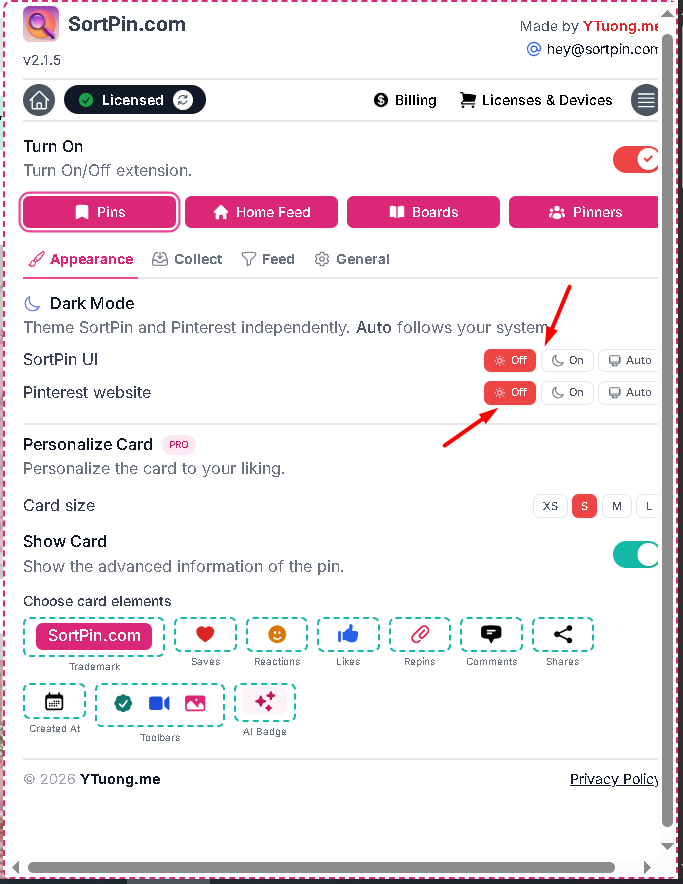
3. Find the **🌙 Dark Mode** section

You get **two independent switches**, each with **Off / On / Auto**:

| Switch                   | What it themes            |
| ------------------------ | ------------------------- |
| 🧩 **SortPin UI**        | The SortPin panel itself  |
| 📌 **Pinterest website** | Pinterest's own interface |

<figure><img src="/files/LSUi9ImQ0IgEVwSANZ5F" alt="Pinterest dark mode settings in the SortPin Appearance tab"><figcaption><p>Appearance tab — separate Off / On / Auto switches for the SortPin panel and the Pinterest website</p></figcaption></figure>

> 💡 **Independent control is the useful part.** You can keep Pinterest light while running the SortPin panel dark, or vice versa. Set either to **Auto** and it follows your system appearance.

### Before and after

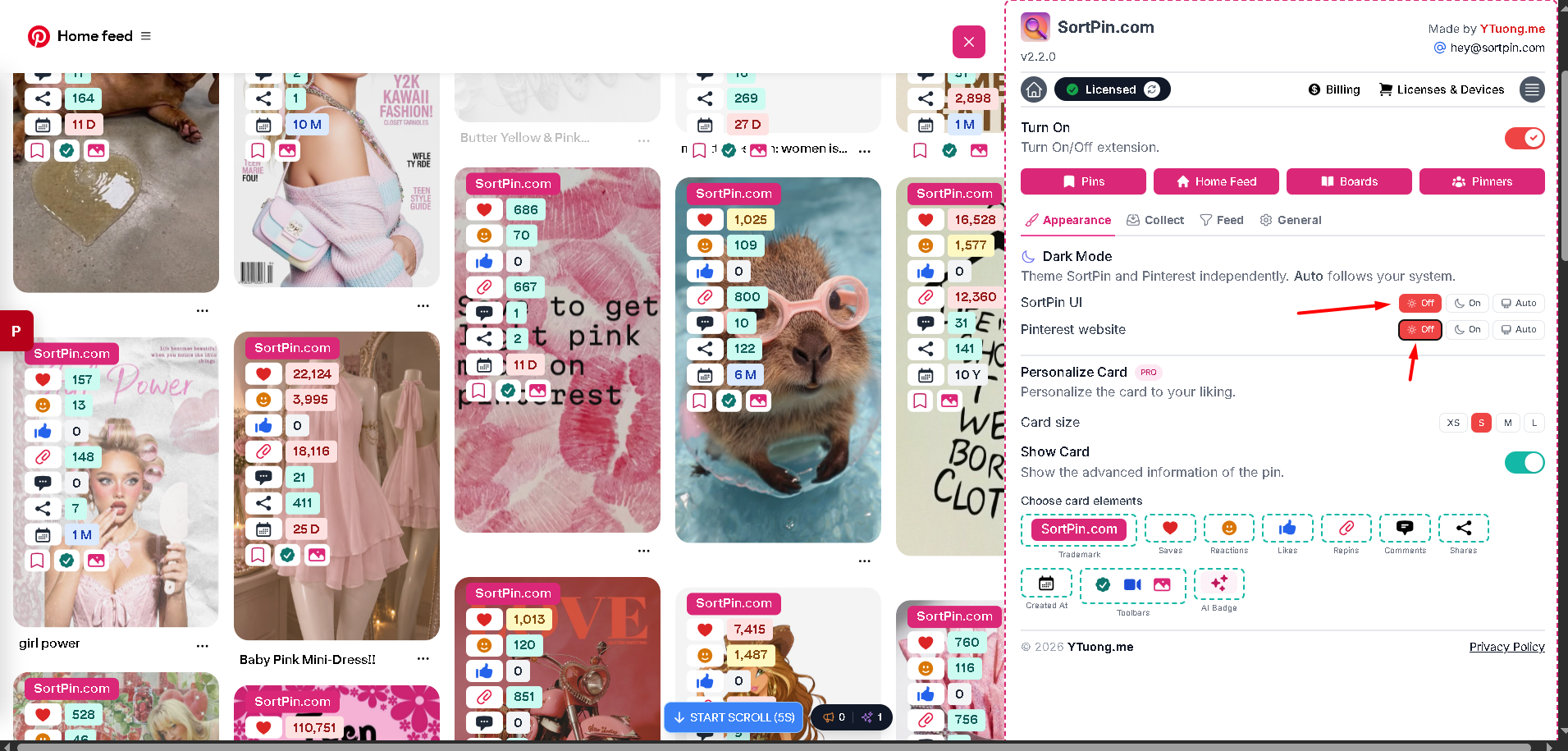
<figure><img src="/files/ZhWo9FwLh7maj852mOJa" alt="Pinterest home feed with SortPin dark mode switched off"><figcaption><p><strong>Both switches Off</strong> — Pinterest's default light interface</p></figcaption></figure>

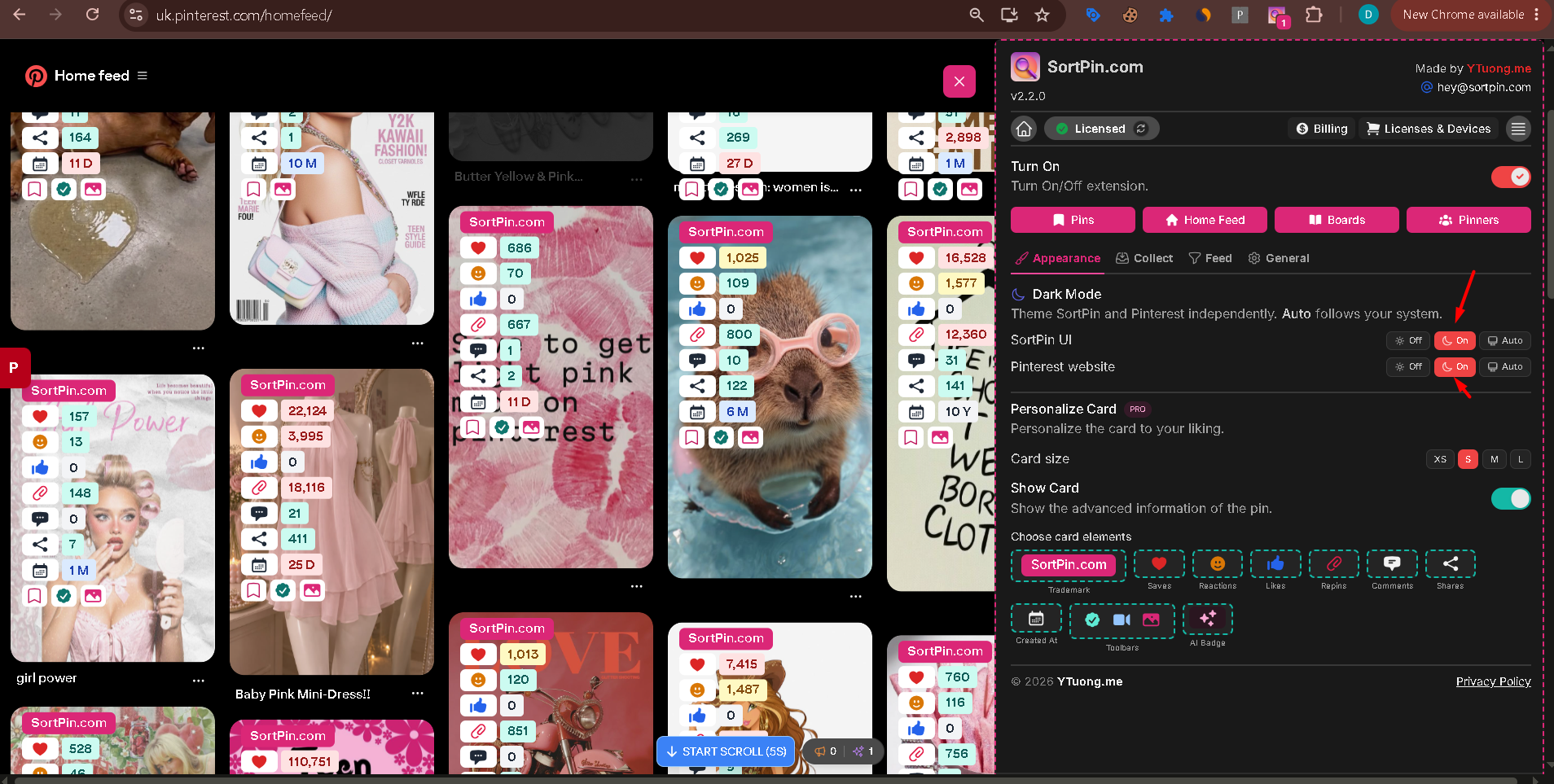
<figure><img src="/files/de6U75YVskCgHgtmgQ2k" alt="Pinterest home feed with SortPin dark mode switched on"><figcaption><p><strong>Both switches On</strong> — the feed and the panel go dark together, and pin images keep their true colours</p></figcaption></figure>

> 🖼️ **Look at the pin images across both screenshots.** They're unchanged. That's the difference between a Pinterest-specific dark mode and a generic one that inverts everything on the page — [more on that below](#-why-not-just-use-a-generic-dark-mode-extension).

### SortPin built-in vs PinDark

|                              | SortPin built-in              | PinDark            |
| ---------------------------- | ----------------------------- | ------------------ |
| Dark Pinterest website       | ✅ Yes                         | ✅ Yes              |
| Dark SortPin panel           | ✅ Yes — controlled separately | ➖ Not applicable   |
| Auto (follow system)         | ✅ Yes                         | ✅ Yes              |
| Multiple themes              | ❌ On/Off only                 | ✅ 11 night + 8 day |
| Custom hex colours           | ❌ No                          | ✅ Yes              |
| Squared corners              | ❌ No                          | ✅ Yes              |
| Pin data, sorting, downloads | ✅ Yes                         | ➖ Not its purpose  |

**Use SortPin's built-in dark mode if** you want Pinterest darker with no extra install and don't need theme choice.

**Add PinDark if** you want to pick *how* dark Pinterest looks — colour, mood, corner style.

👉 [Install SortPin](/getting-started/how-to-install-sortpin.com-extension.md) · 👉 [Install PinDark](https://www.sortpin.com/pinterest-dark-mode)

***

## 📱 Method 3: Dark Mode in the Pinterest Mobile App

The mobile apps have a native appearance setting — no extension needed.

### iPhone / iPad

1. Open the **Pinterest app**
2. Tap your **profile picture** (bottom right)
3. Tap the **⚙️ settings gear** (top right)
4. Go to **Settings → Appearance**
5. Choose **Dark**, or **System default** to follow iOS

### Android

1. Open the **Pinterest app**
2. Tap your **profile picture**
3. Tap the **⚙️ settings gear**
4. Go to **Settings → Appearance**
5. Select **Dark** or **System default**

> ⚠️ Pinterest reorganises its settings menu regularly. If "Appearance" isn't where described, use the search box inside Pinterest settings and type "dark" or "theme".

***

## 🚫 Why Not Just Use a Generic Dark Mode Extension?

General-purpose dark-mode extensions restyle every website with one universal filter. On a site built entirely around images, that causes real problems:

| Problem                 | What happens on Pinterest                              |
| ----------------------- | ------------------------------------------------------ |
| 🖼️ **Inverted images** | Pin photos render like colour negatives                |
| 🎨 **Wrong colours**    | Product and outfit colours become useless for research |
| 💔 **Broken layout**    | Pinterest's grid and overlays fight the injected CSS   |
| 🐌 **Slower scrolling** | Every image gets reprocessed on a media-heavy page     |
| 🔆 **Poor contrast**    | Pin titles wash out against restyled cards             |

PinDark avoids all of this because it's built for one site rather than every site — it restyles Pinterest's interface and **leaves the images alone**.

***

## 🛠️ Troubleshooting

### "Dark mode isn't applying to Pinterest"

1. Refresh the Pinterest tab after installing — extensions don't apply to already-open pages
2. Confirm the extension is **enabled** in your browser's extensions page
3. Pin it to your toolbar so you can see its state at a glance

### "My pin images look inverted or discoloured"

You're running a **generic** dark-mode extension alongside (or instead of) PinDark. Disable the generic one on pinterest.com — PinDark doesn't touch image colours.

### "Two dark modes are fighting each other"

If you have SortPin's built-in dark mode **and** PinDark active, pick one. Turn off SortPin's toggle and let PinDark handle appearance.

### "Dark mode keeps switching back during the day"

That's **auto day/night switching** working as designed. To stay dark permanently, turn auto-switching off and select a night theme manually.

### "It doesn't work in Safari"

Safari support requires **macOS 26.5 or later** and installs from the [Mac App Store](https://apps.apple.com/us/app/dark-mode-for-pinterest/id6794286632), not the Chrome Web Store. On older macOS, use Chrome or Firefox instead.

### "Dark mode broke the SortPin panel"

Both are from the same team and are designed to coexist. If a panel is unreadable, refresh the page — and if it persists, see [SortPin not working](/faqs/if-sortpin-is-not-working-despite-being-installed-what-should-i-do.md).

***

## ❓ FAQs

**Q: Does Pinterest have dark mode on PC?** A: Not natively — Pinterest's desktop website has no built-in dark mode toggle. [PinDark](https://www.sortpin.com/pinterest-dark-mode) adds one for free, with 11 night themes and 8 day themes.

**Q: How do I make Pinterest dark mode on Chrome?** A: Install [PinDark from the Chrome Web Store](https://chromewebstore.google.com/detail/dark-mode-for-pinterest-%E2%80%94/acgmkcgkegbgcdmhabifeigllicffkpb?utm_source=help.sortpin.com\&utm_medium=docs\&utm_campaign=pindark), refresh Pinterest, and pick a theme. It also works on Edge, Brave, Opera, Vivaldi, and Arc.

**Q: Is there a Pinterest dark mode for Firefox?** A: Yes — install it from [Firefox Add-ons](https://addons.mozilla.org/en-US/firefox/addon/dark-mode-for-pinterest-themes/). Full feature parity with the Chrome build: all 11 night themes, 8 day themes, custom colours, and auto-switching.

**Q: Can I get Pinterest dark mode on Safari?** A: Yes, on macOS 26.5 or later, via the [Mac App Store](https://apps.apple.com/us/app/dark-mode-for-pinterest/id6794286632). This is unusual — most Pinterest dark mode tools are Chrome-only.

**Q: Is PinDark free?** A: Yes, completely — all themes and customisation options are included with no premium tier or trial limit.

**Q: Will dark mode change how my pin images look?** A: No. PinDark restyles Pinterest's interface using Pinterest's own night colours and leaves image content untouched. Generic dark-mode extensions do invert images, which is why they're a poor fit for Pinterest.

**Q: What's the difference between SortPin's dark mode and PinDark?** A: SortPin's built-in dark mode (Appearance tab) gives you Off/On/Auto switches for the Pinterest website and the SortPin panel independently. PinDark goes further on appearance — 11 night themes, 8 day themes, custom hex colours, and squared corners.

**Q: Where is dark mode in the SortPin extension?** A: Open the SortPin panel → **Appearance** tab → **Dark Mode**. Set **SortPin UI** and **Pinterest website** separately to Off, On, or Auto.

**Q: Does the Firefox version have the same features?** A: Yes — the Firefox builds of both SortPin and PinDark have full feature parity with the Chrome versions.

**Q: Can I run SortPin and PinDark at the same time?** A: Yes. They're separate extensions from the same team, built to complement each other — SortPin for data and downloads, PinDark for appearance.

**Q: How do I turn on dark mode in the Pinterest app?** A: Profile picture → settings gear → **Appearance** → choose **Dark** or **System default**.

**Q: Does dark mode save battery?** A: On OLED and AMOLED screens, yes — the **Onyx** theme uses true black, which switches those pixels off entirely. On LCD screens the difference is negligible.

**Q: Does PinDark collect my data?** A: No. It runs offline and collects nothing — it only restyles pages locally in your browser.

***

## 👉 Related Guides

* [🚨 Pinterest Not Working — Complete Fix Guide](/pinterest-troubleshooting/pinterest-not-working.md)
* [📲 Pinterest Widget Not Working](/pinterest-troubleshooting/pinterest-widget-not-working.md)
* [🔍 Pinterest Sort Extension — What It Does](/pinterest-growth-and-analytics/best-pinterest-sort-extension-for-chrome-and-firefox.md)
* [🌐 How to Use Pinterest Without an Account](/pinterest-guides/use-pinterest-without-account.md)
* [ℹ️ How to Pin, Disable, or Hide an Extension](/faqs/how-to-temporarily-disable-sortpin.com-extension-info.md)
* [🇻🇳 Tiếng Việt: Cách bật chế độ tối cho Pinterest](/vi/pinterest-che-do-toi.md)

{% hint style="info" %}
💬 **Want a theme that doesn't exist yet?** Tell our [chat support](https://go.crisp.chat/chat/embed/?website_id=48b6c12a-2212-4be1-9e27-2dad7e2d5fb0) team — theme requests genuinely shape what gets built next.
{% endhint %}