> For the complete documentation index, see [llms.txt](https://help.sortpin.com/llms.txt). Markdown versions of documentation pages are available by appending `.md` to page URLs; this page is available as [Markdown](https://help.sortpin.com/pinterest-troubleshooting/pinterest-image-search-lens.md).

# Pinterest Image Search & Lens Not Working

{% hint style="warning" %}
**"Pinterest reverse image search is gone!"** — this is one of the most common complaints from desktop users. Pinterest has repeatedly moved, restricted, or removed visual search entry points on the web. Here's what still works, and what to do instead.
{% endhint %}

> 🎉 **Trusted by 40,000+ Pinterest users worldwide** — visual search is how many of them find source pins.

## 📊 Where Visual Search Actually Works

| Platform                     | Search by uploaded image        | Search within a pin (Lens crop) |
| ---------------------------- | ------------------------------- | ------------------------------- |
| 📱 **Pinterest mobile app**  | ✅ Yes — camera / photo library  | ✅ Yes — the magnifier on a pin  |
| 🌐 **Pinterest desktop web** | ⚠️ Limited / frequently changed | ⚠️ Sometimes available on pins  |
| 📲 **Mobile browser**        | ❌ Usually unavailable           | ❌ Usually unavailable           |

> ⚠️ Pinterest changes these entry points often. If a button described here isn't where you expect, it's likely been moved again — the workarounds below don't depend on Pinterest's UI.

***

## 📱 Method 1: Pinterest Lens in the Mobile App (Most Reliable)

The mobile app is where Pinterest's visual search is most consistently available.

### Search using your camera or photo library

1. Open the **Pinterest app**
2. Tap the **search bar**
3. Tap the **📷 camera icon** on the right side of the search bar
4. Either:
   * **Take a photo** of an object, room, outfit, or product, or
   * Tap the **photo library icon** to upload an existing image
5. Pinterest returns visually similar pins

### Search inside an existing pin

1. Open any pin in the app
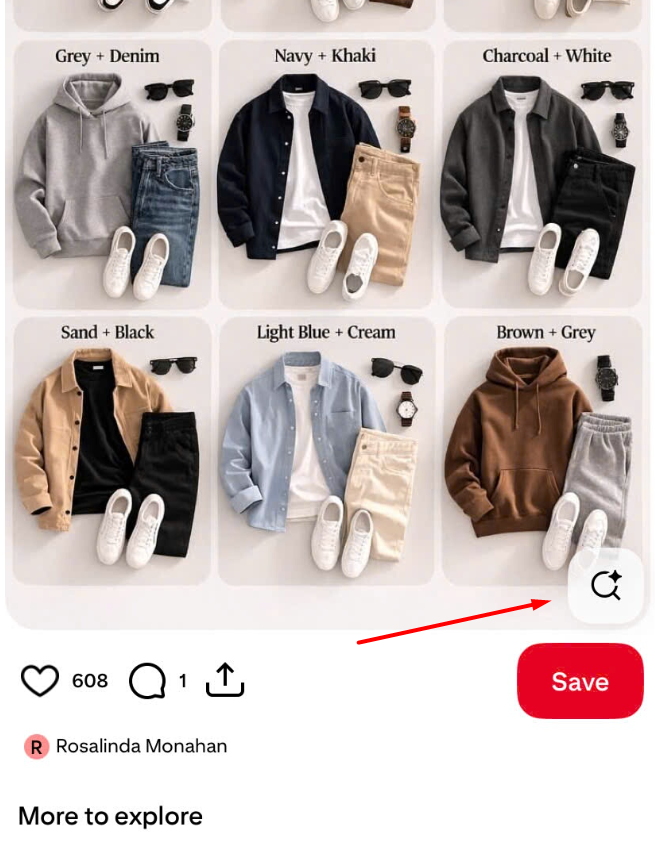
2. Look for the **🔍 magnifier icon** in the **bottom-right corner of the image**
3. Tap it, then **drag the crop box** over the part you care about (a lamp, a jacket, a plant)
4. Pinterest searches only that region

<figure><img src="/files/RyjAYScfP2jWhBsuD9zC" alt="The Pinterest visual search icon on a pin"><figcaption><p>The magnifier sits on the image itself, bottom right — easy to miss because it's low contrast</p></figcaption></figure>

<figure><img src="/files/3QfVQ5bdcpTDa71LGKx3" alt="Pinterest visual search results showing visually similar pins"><figcaption><p>Results are visually similar pins, with your source image shown as a thumbnail at the top</p></figcaption></figure>

> 💡 **This is the single best feature for finding "where can I buy this?"** — crop to the exact product rather than searching the whole photo.

> 👀 **The icon is genuinely hard to spot.** It's a small, semi-transparent magnifier over the bottom-right of the image, and it only appears on pins Pinterest thinks are searchable. If you can't see it on one pin, try another.

***

## 💻 Method 2: Desktop Workarounds

If the desktop visual search entry point is missing for you, use one of these instead.

### Workaround A — Use Google Lens with a Pinterest URL

Google indexes Pinterest heavily, so reverse-searching a pin image through Google often finds the original source *and* related pins.

1. Right-click the pin image → **Copy image address** (or use SortPin to grab the direct file)
2. Open **Google Images** → click the **camera icon**
3. Paste the image URL, or upload the downloaded file
4. Review results — Pinterest pins usually appear alongside the original source

> 🖼️ Need the actual image file rather than a blocked right-click? See [How to download Pinterest images](/download-guides-by-content-type/how-to-download-pinterest-images.md) — Pinterest disables right-click save on many pins.

### Workaround B — Search Pinterest by text with better queries

Visual search is convenient but text search is more precise when you know the vocabulary.

| Instead of image-searching | Try this text query                     |
| -------------------------- | --------------------------------------- |
| A room photo               | `mid century living room beige boucle`  |
| An outfit                  | `winter capsule wardrobe neutral tones` |
| A product                  | `brand name + product type + colour`    |
| A plant                    | `plant name + care`                     |

👉 Learn the method: [Pinterest keyword research](/pinterest-growth-and-analytics/how-to-do-pinterest-keyword-research.md)

### Workaround C — Use the mobile app for the search, desktop for the work

Practical hybrid many people use daily:

1. Visual-search on your phone to identify the pin
2. Send the pin link to yourself (or to the [SortPin Telegram bot](/features/telegram-bot-pinterest-images-video-and-story-downloader.md))
3. Open it on desktop to save, download, or research further

***

## 🛠️ Troubleshooting

### "Pinterest reverse image search is gone from desktop"

Pinterest has changed and removed web visual-search entry points multiple times. Use the mobile app (most reliable), or Google Lens as a substitute for reverse-searching a pin image.

### "The camera icon isn't in my Pinterest search bar"

* **Update the app** — the icon is missing from older builds
* Some features roll out gradually by region and account
* Check you're on the **Home** or **Search** tab; the icon isn't shown everywhere

### "Pinterest image search returns irrelevant results"

* **Crop tighter** — searching a whole room photo gives room results; crop to just the chair
* **Improve lighting and angle** if you're using the camera
* Very generic objects (a plain white mug) will always return generic results

### "Image search works on my phone but not my laptop"

That's expected — Pinterest's visual search has always been stronger in the app. Use the [desktop workarounds](#method-2-desktop-workarounds) above.

### "Pinterest Lens says it can't find anything"

Lens needs a recognisable subject. Blurry photos, extreme close-ups, and abstract patterns often return nothing. Retake with the object filling most of the frame.

***

## 🎯 What SortPin Adds to Visual Research

SortPin doesn't replace Pinterest's visual search, but it solves what happens **after** you find a pin:

| Task                              | How SortPin helps                                                                                                         |
| --------------------------------- | ------------------------------------------------------------------------------------------------------------------------- |
| 🔍 See a pin's real engagement    | [View hidden repin and save counts](/pinterest-growth-and-analytics/how-to-see-pinterest-pin-repin-and-save-counts.md)    |
| 📥 Save the image at full quality | [Download Pinterest images](/download-guides-by-content-type/how-to-download-pinterest-images.md)                         |
| 📊 Compare many pins at once      | [Sort pins by saves and date](/pinterest-growth-and-analytics/how-to-sort-pinterest-pins-by-saves-date-and-popularity.md) |
| 🗂️ Keep a research history       | Pins, boards and pinners you view are saved automatically                                                                 |

👉 [See all SortPin features](/getting-started/overview-of-key-features.md)

***

## ❓ FAQs

**Q: Can you reverse image search on Pinterest?** A: Yes, most reliably in the Pinterest mobile app — tap the camera icon in the search bar to search with a photo, or tap the magnifier on a pin to search a cropped region. Desktop web support has been inconsistent.

**Q: Why did Pinterest remove reverse image search on desktop?** A: Pinterest hasn't published a full explanation, and the feature's availability on web has changed several times. Practically speaking, the mobile app is where visual search consistently works.

**Q: How do I search Pinterest by image on PC?** A: Either use the Pinterest app on your phone, or reverse-search the pin image through Google Images (camera icon → paste image URL or upload the file).

**Q: What is Pinterest Lens?** A: Pinterest's visual search feature. It identifies objects in a photo — furniture, clothing, food, plants — and finds visually similar pins. It lives in the mobile app's search bar and on individual pins.

**Q: Is Pinterest Lens available on desktop?** A: Not dependably. Some pins show a magnifier on web, but the full camera-based Lens experience is a mobile app feature.

**Q: Why is Pinterest image search not working?** A: Most often an outdated app, a staged feature rollout, or you're on desktop where support is limited. Update the app first, then try the same search on mobile.

**Q: Can I find the original source of a Pinterest image?** A: Open the pin and check its destination link first. If there isn't one, reverse-search the image through Google Images — that frequently surfaces the original site.

**Q: Does SortPin do reverse image search?** A: No. SortPin focuses on pin data, sorting, and downloading. For visual search use Pinterest's app or Google Lens, then use SortPin to analyse and save what you find.

***

## 👉 Related Guides

* [🚨 Pinterest Not Working — Complete Fix Guide](/pinterest-troubleshooting/pinterest-not-working.md)
* [🔍 Why Is Pinterest Search Not Working?](/pinterest-troubleshooting/why-is-pinterest-search-not-working.md)
* [🖼️ How to Download Pinterest Images](/download-guides-by-content-type/how-to-download-pinterest-images.md)
* [📊 How to See Pinterest Repin & Save Counts](/pinterest-growth-and-analytics/how-to-see-pinterest-pin-repin-and-save-counts.md)

{% hint style="info" %}
💬 **Can't find a pin's source?** Our [chat support](https://go.crisp.chat/chat/embed/?website_id=48b6c12a-2212-4be1-9e27-2dad7e2d5fb0) team is happy to help you track it down.
{% endhint %}